
Testing VPC Connectivity
Project Link: View Project
Author: Duc Thai
Email: ducthai060501@gmail.com
Testing VPC Connectivity

Introducing Today's Project!
What is Amazon VPC?
Amazon VPC (Virtual Private Cloud) is a virtual network in AWS that you control, similar to having your own private data center in the cloud. It lets you define IP ranges, subnets, route tables, security groups, and network ACLs.
It’s useful because it allows you to isolate resources for security, control how servers communicate with each other and the internet, and manage network traffic efficiently. Essentially, it gives you full control over your cloud network while keeping your applications secure and organized.
How I used Amazon VPC in this project
In today's project, I used Amazon VPC to let resources in my network communicate with each other, allow my public server to access the internet, and keep my private server secure. I connected to the public instance using SSH, tested communication to the private instance with ping, and checked internet access with curl. I also identified some connection issues and fixed them by updating the network ACLs and security group rules. This helped me understand how VPC controls traffic and secures resources in AWS.
One thing I didn't expect in this project was...
One thing I didn’t expect in this project was how many small settings in the network could block connectivity—like security group rules, NACLs, or route tables. Even a tiny misconfiguration could stop SSH, ping, or internet access, which taught me that careful planning and troubleshooting are very important in AWS networking.
This project took me...
This project took me 90 minutes.
Connecting to an EC2 Instance
Connectivity means how well different parts of your network talk to each other and with external networks. It's essential because connectivity is how data flows smoothly across your network, powering everything from simple web hosting on the Internet to complex operations.
My first connectivity test was whether I could connect to my public server using the key pair and the public IP address. This confirmed that my security group, subnet, and internet gateway were set up correctly, and that the server was reachable from the internet.
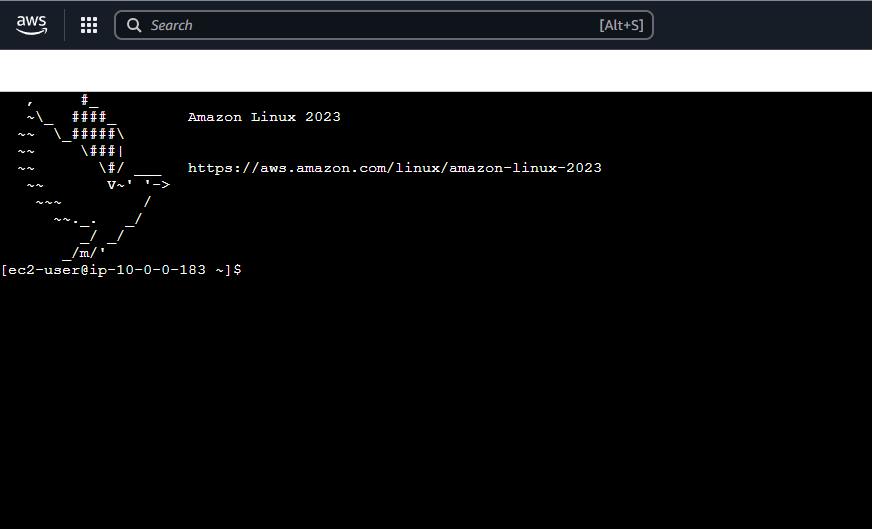
EC2 Instance Connect
I connected to my EC2 instance using EC2 Instance Connect, which is a browser-based SSH client provided by AWS. It lets you securely connect to your instance without needing to download or manage an external SSH client or private key on your computer.
My first attempt at getting direct access to my public server resulted in an error because the security group attached to my EC2 only allowed inbound HTTP traffic and SSH from limited sources. Since SSH wasn’t open to my IP address, the connection was blocked. I had to update the security group rules to allow SSH access from my IP so I could connect successfully.
I fixed the connection error by updating the security group rules for my EC2 instance. I added an inbound rule to allow SSH (port 22) from my IP address. After saving the changes, I was able to connect to the public server successfully.

Connectivity Between Servers
Ping is a simple network tool that sends small packets of data to another computer to check if it’s reachable and how long it takes to respond. I used ping to test the connectivity between my public EC2 instance and my private EC2 instance in the same VPC, to make sure they could communicate with each other over the network.
The ping command I ran was ping 10.0.1.69 (which is the ipv4 address of my private instance).
The first ping returned 172 packets transmitted, 0 received, 100% packet loss, which meant that my public server could not reach the private server. This usually happens when the security group or network ACL rules don’t allow ICMP (ping) traffic, so the packets are blocked before they reach the private server.
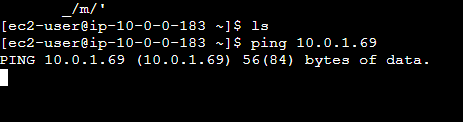
Troubleshooting Connectivity
I troubleshooted this by updating my network ACL (NACL) and security group inbound rules to allow ICMP traffic (ping). After making these changes, the public server was able to successfully communicate with the private server, confirming that the network settings were correctly configured.
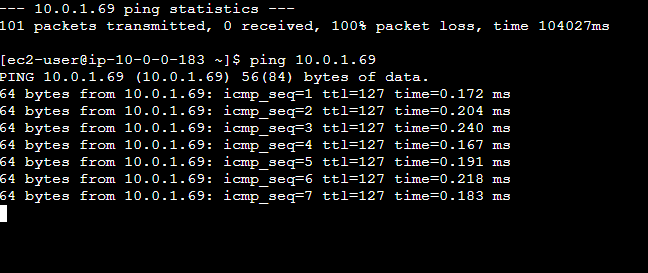
Connectivity to the Internet
curl is a command-line tool used to send requests to a server and get a response. It’s often used to check if a website, API, or server is reachable and returning data correctly. I used curl to test whether my Public Server could access the internet and communicate with external services.
I used curl to test the connectivity between internet and receive data from external websites or APIs. It helped me confirm that the internet gateway, route table, and security group settings were working correctly for outbound traffic.
Ping vs Curl
Ping and curl are different because they test network connectivity in different ways:
Ping checks if a server is reachable by sending small packets (ICMP) and measuring response time. It only tells you if the server is online and reachable.
curl sends actual requests (like HTTP or HTTPS) to a server and retrieves data. It tests not just connectivity but also whether the server or service is responding correctly.
In short, ping tests basic reachability, while curl tests real communication and data transfer.
Connectivity to the Internet
The successful curl command I ran was:
curl example.com
This command sent a request from my Public Server to example.com and returned the HTML content of the page. It showed that my server could access the internet and retrieve data, confirming that the internet gateway, route table, and security group settings were working correctly for outbound traffic.