
Data Engineering with Postgres & Docker MCP
Project Link: View Project
Author: Duc Thai
Email: ducthai060501@gmail.com
Introducing Today's Project!
In this project, I’m setting up my own database workflow using Docker and PostgreSQL. I’ll start by spinning up a PostgreSQL database inside a Docker container, which gives me an isolated and easily reproducible environment to work with. After connecting to the database—using either a database client or a Python script—I’ll create the necessary schema and then bulk load around 40,000 rows of data.
Once the data is loaded, I’ll practice querying the database to extract meaningful information. Finally, I’ll visualize the results using a tool like Python’s matplotlib or seaborn, allowing me to better understand trends or distributions in the data.
PostgreSQL is a powerful open-source relational database known for its robustness and advanced features, while Docker is a containerization platform that makes it easy to run applications in isolated, portable environments. This project is a practical exercise in modern data engineering and analysis, from provisioning infrastructure.
Key tools and concepts
The key tools I used in this project include Docker for containerizing and managing my PostgreSQL database, the PostgreSQL database itself for storing and querying data, and MCP servers (Docker MCP and PostgreSQL MCP) to automate interactions between my editor (Cursor) and actual running services. I also worked with uv, a fast Python package manager, for handling project dependencies and setting up my environment efficiently.
Key concepts I learnt include containerization for isolated, reproducible environments, database administration tasks such as user management and index creation, and performance auditing using EXPLAIN ANALYZE and table statistics. I also practiced loading realistic demo data, visualizing database schemas with Mermaid ER diagrams, and interpreting audit findings to optimize query speed and resource use. Altogether, these tools and concepts gave me hands-on experience with modern data infrastructure, automation, and performance tuning.
Challenges and wins
This project took me approximately two hours to complete. The most challenging part was setting up the initial environment—especially getting Docker, PostgreSQL, and all the MCP servers to work together smoothly. It was most rewarding to see my database queries accelerate dramatically after adding the right indexes and to visualize my data with clear ER diagrams.
With the skills I learned here, I want to build more data-driven applications, automate infrastructure setup, and tackle larger, real-world datasets with confidence using containers and modern SQL workflows.
Why I did this project
I did this project today to learn how to set up and manage a real-world database environment using Docker and PostgreSQL, and to gain hands-on experience with database performance tuning and automation tools like MCP servers. Working through each step helped me understand not just how to create and query a database, but also how to optimize it for speed and reliability.
This project definitely met my goals—I was able to practice deploying containers, loading and analyzing data, and improving query performance. Another database skill I want to learn is how to set up automated backups and restore workflows, so I can ensure data safety and easily recover from any issues.
Setting Up Docker and UV
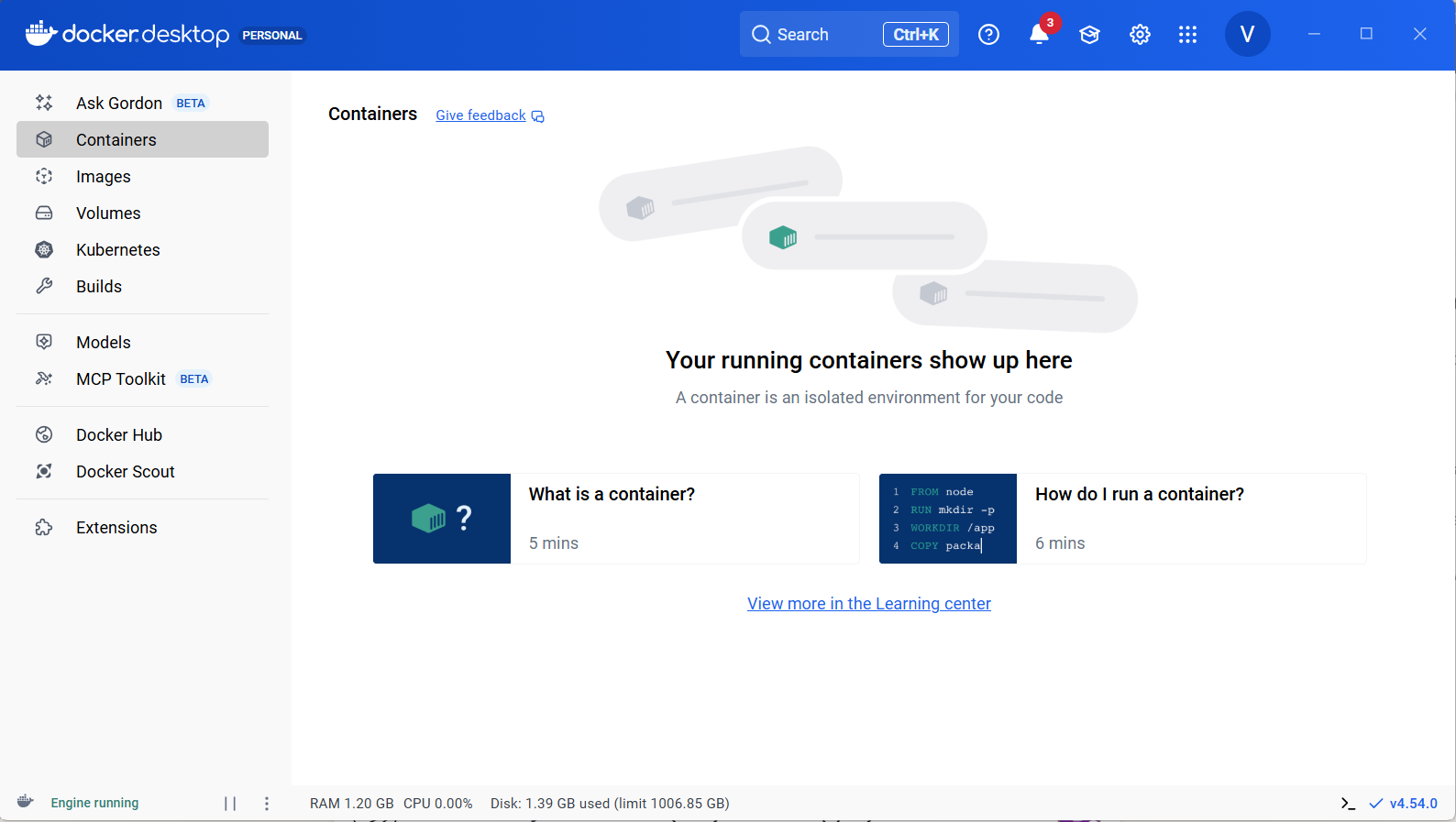
In this step, I’m setting up my development environment by installing the necessary tools. Docker Desktop will help me easily manage and run containers on my local machine, making it simple to launch a PostgreSQL instance in an isolated environment. I’m also installing uv, a fast Python package manager, to streamline the process of managing project dependencies and virtual environments. This setup ensures my workflow is consistent, efficient, and ready for database experimentation.
What's Docker and why containers?
We are using a Docker container to create an isolated, reproducible environment for our PostgreSQL database. This is important because it ensures consistency across different machines and setups, eliminates “it works on my machine” problems, and makes it easy to spin up or tear down our database with a single command. With Docker, we don’t have to manually install or configure PostgreSQL on our local system—instead, everything needed to run the database is packaged within the container. This also makes it simple to share our setup with others or deploy it to the cloud, since the container will behave the same way everywhere. Overall, containers streamline development, improve reliability, and reduce setup headaches.
Verifying installations
The tools I set up in my environment included uv, a fast Python package manager that simplifies installing and managing Python software. We'll use uv specifically to install the MCP servers and handle project dependencies efficiently. After installation, I confirmed everything was working correctly by running uv --version to check that the tool was properly set up in my system. This ensures a smooth workflow for managing packages and keeps our environment consistent and reliable.
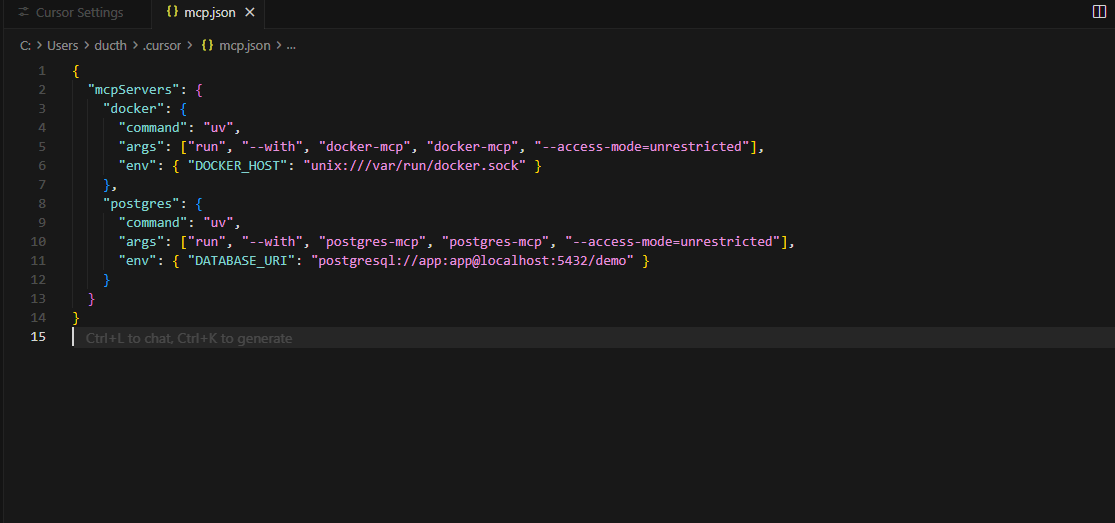
Connecting MCP Servers
In this step, I'm installing MCP servers, which are essential programs that allow AI models like Claude in Cursor to interact directly with my running tools—not just read or edit files in the editor. Without MCPs, Cursor is limited to static code manipulation. But with MCPs set up, Cursor can actually start and stop Docker containers, run SQL queries on my databases straight from chat, and help manage these tools by following my instructions.
In other words, MCP servers bridge the gap between my editor and the real infrastructure, enabling Cursor to work with live systems like Docker and PostgreSQL, instead of just the code on disk. This unlocks a whole new level of automation and convenience in my workflow.
Python project setup
The command uv init set up a Python project because it’s important to organize our code and dependencies in a structured way, making development, collaboration, and deployment much smoother. The files created include:
- pyproject.toml: This file is the central place for managing project metadata and dependencies. It defines which packages are required and helps tools like
uvorpipknow how to build and install the project. - .gitignore: This file specifies which files or folders should be ignored by version control (Git), keeping things like compiled files, virtual environments, or sensitive information out of our repository.
- README.md: This serves as documentation for the project, explaining what the project does, how to use it, and any other important details for users or collaborators.
- main.py: This is the default Python script where the main logic of the project begins. It’s a handy starting point for writing and testing our application code.
Installing Docker MCP
Building My Database
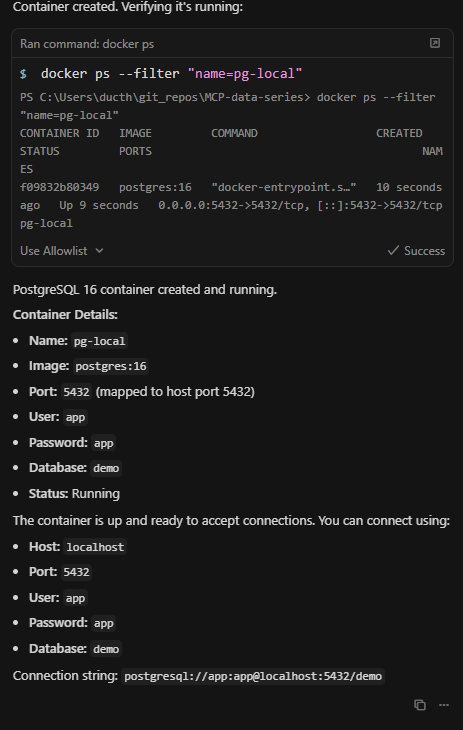
In this step, I'm going to use the Docker MCP to guide Cursor in creating a new PostgreSQL container. With Docker MCP, I can manage the lifecycle of my database container directly from the chat interface. Next, I'll use the PostgreSQL MCP to configure database users and permissions, making sure my setup is both functional and secure.
Once the database is ready, I'll load some demo data into it so I have something meaningful to work with. After the data is loaded, I'll visualize the database contents—this helps me better understand the data structures, spot trends or anomalies, and verify that my setup is working as expected. Leveraging MCPs in this way allows me to manage, manipulate, and monitor both Docker and PostgreSQL instances seamlessly from Cursor, streamlining my workflow and making hands-on database work much more efficient.
Database security
Every PostgreSQL database comes with a default superuser, which has unrestricted access to all data and administrative functions. I created an application user to handle day-to-day database interactions for my app, granting it only the specific permissions required for running queries and managing data.
This is a security best practice because it minimizes risk—using a less-privileged account helps prevent accidental or malicious changes to the entire database system. If my application is ever compromised, the potential damage is limited since the attacker would not have superuser access. By separating administrative and application privileges, I ensure a safer and more controlled environment for both my data and infrastructure.
Loading demo data
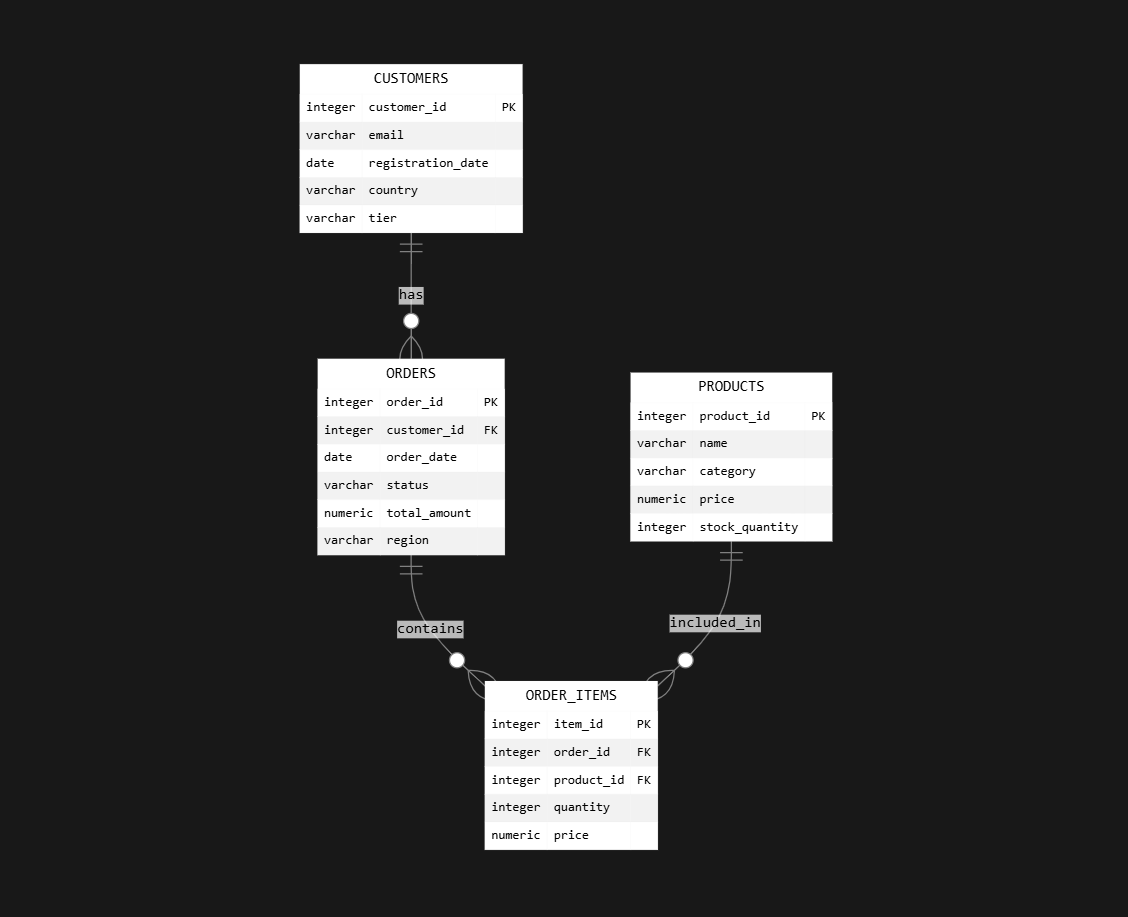
I loaded the demo data by creating a demo_data.sql file that defines a realistic e-commerce schema and populates it with sample records. This script sets up four tables: customers, products, orders, and order_items, along with their relationships.
- The customers table holds 2,000 users, each with emails, registration dates, countries, and tier levels (bronze, silver, gold, platinum).
- The products table includes 1,000 items across diff categories, specifying prices and stock quantities.
- The orders table adds 10,000 order records, complete with statuses, dates, and regional information.
- The order_items table creates over 30,000 records linking orders to products, detailing quantities and prices.
This dataset is ideal for practicing SQL queries and database analysis, simulating a real e-commerce environment.
After generating the SQL file, I loaded it into my PostgreSQL container by running:
Get-Content demo_data.sql | docker exec -i pg-local psql -U app -d demoVerifying and visualizing the database
I verified my database by prompting Cursor to use the Postgres MCP to read the database schema and sample three rows from each table. I asked Cursor to generate a Mermaid ER diagram, which visually represents the structure and relationships in my database, including some actual sample data for context. I specifically requested that the diagram be rendered directly in the chat with a high-contrast style for clear readability.
The Mermaid ER diagram displays tables as labeled boxes, columns as fields within those boxes, and relationships as connecting lines or arrows between related tables. Example values from the sampled rows are included, which makes it easy to see not just the schema but also the kind of data stored in each part of the database. This approach provided a quick and visual overview of both the database structure and its contents, confirming that the setup and data loading were successful.
Performance Audit
I'm going to perform a database performance audit, which involves analyzing how efficiently my database processes queries. This audit helps identify slow queries that may need optimization, missing indexes that could be causing searches to run slower than necessary, and any underlying health issues or bottlenecks affecting overall performance and resource usage.
Database administrators pay close attention to these factors because slow queries in production environments can lead to poor user experience, increased server costs, and even system instability. By pinpointing and optimizing inefficient queries, adding the right indexes, and resolving health issues, I can ensure my database runs smoothly, scales effectively, and delivers faster results—helping both application performance and long-term maintainability.
Audit findings
I asked Cursor’s PostgreSQL MCP to audit my database by running targeted checks on the app schema (customers, orders, order_items, products). Specifically, I requested an EXPLAIN ANALYZE on a join between orders and customers, a scan for missing indexes on foreign key columns, and a cache hit rate query.
Cursor’s audit found several areas for improvement:
- Missing indexes on important foreign keys:
orders.customer_idandorder_items.order_idlacked indexes, causing sequential scans on large tables, which will slow down join queries as data volume grows.order_items.product_idalso lacked an index, potentially leading to inefficient product lookups.
- Sequential scan on the orders table during joins:
- Although current performance is fast with small data (0.605ms for the join), this will degrade as the database grows.
- Cache hit rate was excellent (99.93%), meaning almost all queries are served from cache and there’s no immediate need to tune cache or buffer.
Performance gains
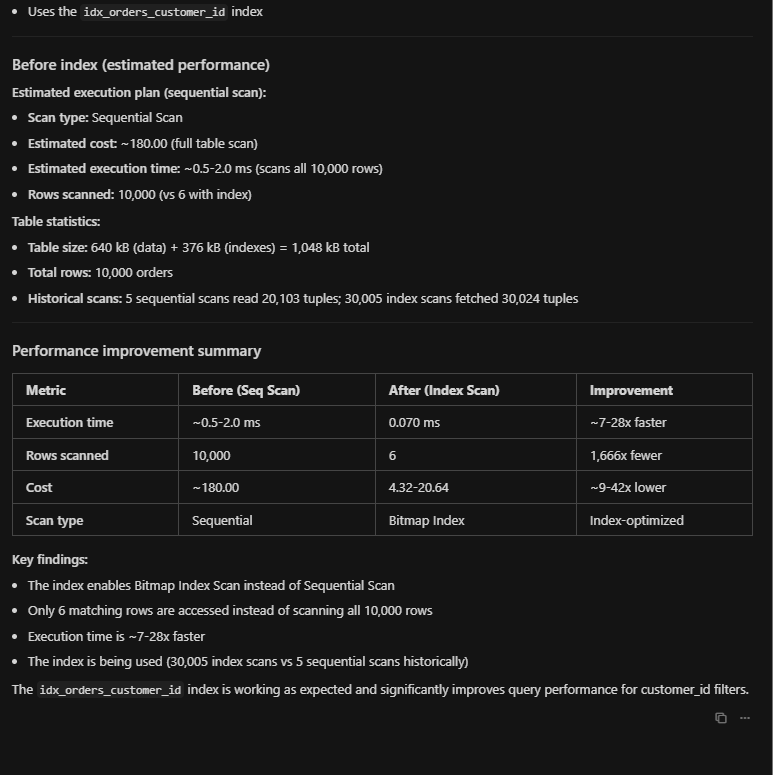
I implemented all the recommended indexes using the Postgres MCP, executing each CREATE INDEX statement and confirming successful creation. After adding the indexes, query performance improved significantly.
Running EXPLAIN ANALYZE on a query filtering orders by customer_id, I observed a dramatic drop in execution time and resources used. The execution plan changed from a sequential scan—which reads every row in the orders table—to a bitmap index scan, where only rows matching the filter are accessed. This means the database is now using the index to directly locate relevant records, rather than scanning the entire table.
Performance comparison:
- Before indexing: Queries performed a sequential scan, reading all 10,000 rows just to find a handful of matches. Estimated execution time was between 0.5 and 2.0 ms and the cost was around 180.00.
- After indexing: The database now performs a bitmap index scan and a bitmap heap scan, scanning only 6 rows to return the same