
Save User Info with a Lex Chatbot
Project Link: View Project
Author: Duc Thai
Email: ducthai060501@gmail.com
Save User Info with a Lex Chatbot
Introducing Today's Project!
What is Amazon Lex?
Amazon Lex is a service from AWS that helps you build conversational chatbots using both voice and text inputs. It’s useful because it makes it easy to create intelligent bots that understand natural language, manage conversation flows, and integrate with other AWS services. With Lex, you can automate customer support, collect information, and provide instant responses—making user interactions smoother, more helpful, and scalable without a ton of manual coding.
How I used Amazon Lex in this project
In today's project, I used Amazon Lex to build a chatbot capable of remembering user details, like birthday, across multiple conversation turns. I set up intents such as CheckBalance and FollowupCheckBalance, used context tags to manage and transfer information between them, and experimented with context expiry to control how long the bot retains user data. This helped me explore how Lex streamlines conversation flows while protecting user privacy.
One thing I didn't expect in this project was...
One thing I didn’t expect in this project was how much context management affects the chatbot’s overall flow and user experience. I realized that subtle things—like how long the bot remembers user info or how quickly it forgets—can totally change whether conversations feel smooth and natural or repetitive and frustrating. It was eye-opening to see how technical choices around context expiry make a big difference in real interactions!
This project took me...
This project took me 40 mins.
Context Tags
Context tags in Amazon Lex let your chatbot remember and check for specific information throughout a conversation, so users don’t have to repeat themselves. There are two types:
Output context tags store details (like account type or birthday) after an intent finishes, allowing that info to be reused by other intents later.
Input context tags check if certain information is already present before an intent activates—for example, a follow-up intent can look for a saved date of birth and skip asking for it again. This makes conversations smoother and more efficient for users.
There are two types of context tags: output context tags and input context tags.
- Output context tags are used by the chatbot to remember certain pieces of information after an intent is completed, making that data available for future intents in the same conversation.
- Input context tags, on the other hand, allow the chatbot to check if specific details are already present before activating an intent, so it can skip asking for information the user has already provided. This helps create a smoother and more intelligent conversational flow.
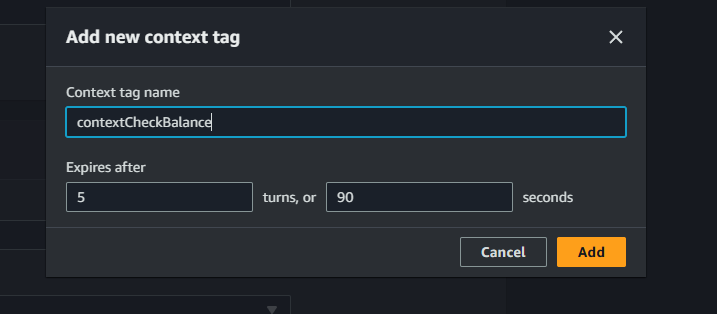
I created a context tag called contextCheckBalance in the CheckBalance intent. This context tag is used to store information about the user’s birthday, allowing the chatbot to remember it and share it with other intents, so users don’t have to keep repeating their birthday during the conversation. This helps streamline the chat and makes the experience feel more natural and connected.
FollowUpCheckBalance
I created a new intent called FollowupCheckBalance and configured it with the following settings:
- Intent Name: FollowupCheckBalance
- Description: Allows users to request a follow-up balance check without additional authentication.
Context Settings:
- Under the Contexts pane, I set
contextCheckBalanceas the Input context. This enables the chatbot to remember and reuse user information already collected, like their birthday.
Sample Utterances:
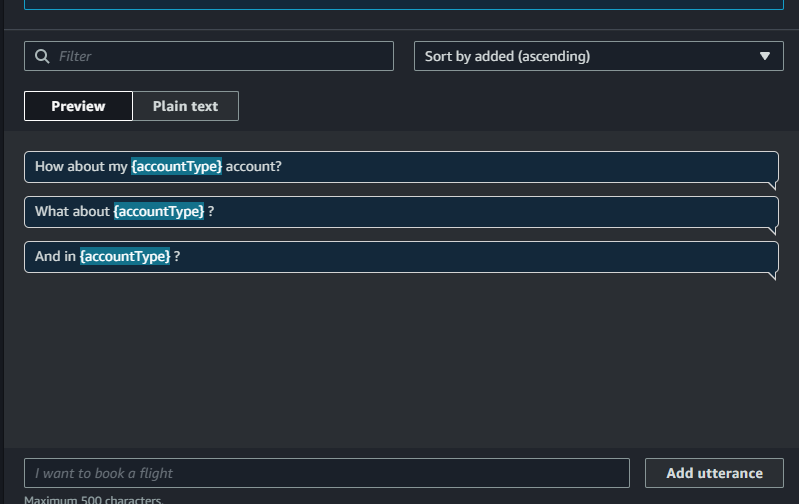
- How about my {accountType} account?
- What about {accountType}?
- And in {accountType}?
Slots:
- accountType
- Prompt: For which account would you like your balance?
- Slot type: accountType
- dateOfBirth
- Prompt: For verification purposes, what is your date of birth?
- Slot type: AMAZON.Date
The purpose of this intent is to let users easily ask about different account balances in the same chat session, using already collected details for a smoother experience.
FollowupCheckBalance and CheckBalance are connected through the way I handle user data, specifically the dateOfBirth slot. Here’s how I linked these intents:
- Default Value Setup:
- In the FollowupCheckBalance intent page, I expanded the dateOfBirth slot.
- Went to Advanced Options and scrolled down to the Default values panel.
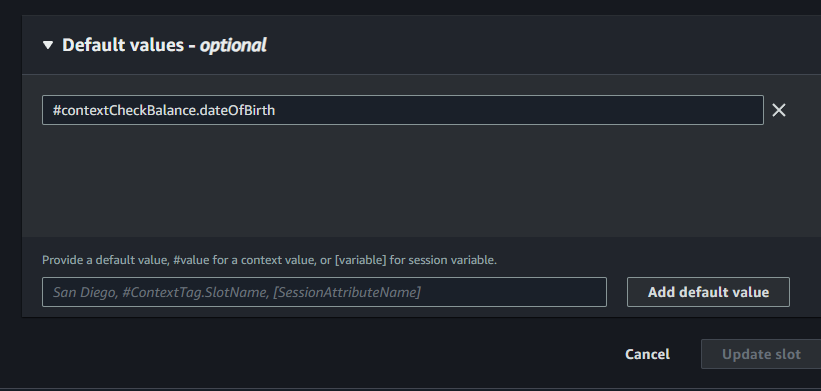
- Entered
#contextCheckBalance.dateOfBirthto use the previously saved birthday from the CheckBalance intent. - Added and updated the slot to confirm the changes.
- Context Tag Usage:
- The input context tag in FollowupCheckBalance lets the bot know to look for saved info from CheckBalance.
- This means the user’s birthday doesn’t need to be re-entered in a follow-up check.
- Fulfillment Connection:
- I checked the Fulfillment pane to ensure the Lambda function is properly linked to this intent for smooth response handling.
This setup allows the chatbot to reuse user information seamlessly.
Input Context Tag
I created an input context, contextCheckBalance, that lets my chatbot recognize and reuse important information—like the user's birthday—collected during the CheckBalance intent. By connecting this input context to the output context from CheckBalance, the bot automatically carries over those details, so when a follow-up intent triggers, it can access the saved info without prompting the user again. This setup streamlines the conversation and creates a smoother, more intelligent chat experience.
The final result!
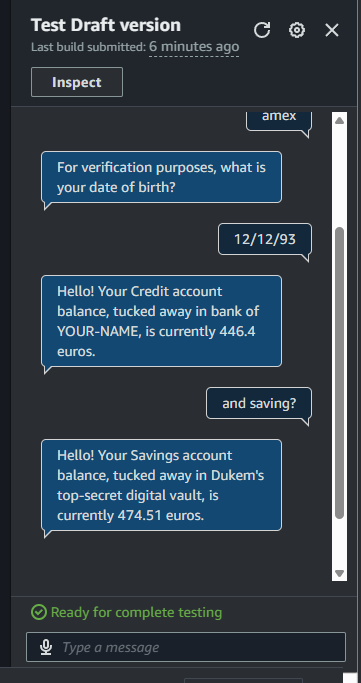
To demonstrate context tags and the follow-up intent, I started by asking my bot for the balance in my Amex account, which triggered the CheckBalance intent. The bot asked for my date of birth, and I provided it. When I followed up with, “What about my savings account?”, the chatbot activated FollowupCheckBalance—using the previously saved birthday from context and didn’t prompt me for it again. This seamless handoff showed how the bot remembers user info across intents, making the conversation flow naturally and efficiently.
If I had tried to trigger FollowupCheckBalance without setting up any context first, the intent wouldn’t have the user’s birthday info available. That means the bot would prompt me again for my date of birth—just like it did in the initial CheckBalance intent. Without the context tags carrying information forward from previous interactions, the chatbot can’t automatically reuse details, so the conversation becomes repetitive and less smooth.
Managing context expiry
Context expiry refers to how long my chatbot will remember specific user information before clearing its memory. For this project, I set contextCheckBalance’s expiry so BankerBot only keeps details from the CheckBalance intent—like accountType and dateOfBirth—for 5 turns or 90 seconds. Once either limit is reached (5 chatbot messages sent or 90 seconds elapsed), the context is erased and the bot will ask for those details again if needed. By default, Amazon Lex uses 5 turns or 90 seconds as its expiry settings, ensuring user data isn’t stored longer than needed.
I updated my bot’s context expiry so it now remembers user info for just 1 turn or 90 seconds. This means my chatbot will forget details—like account type or date of birth—after a single message exchange or after 90 seconds have passed. For end users, this provides added privacy and ensures sensitive data isn’t kept longer than necessary, but it also means they might have to re-enter details more often during longer conversations.
I would use a long context expiry window when I expect users to have extended conversations or move through several intents in the same session—so they don’t have to keep repeating the same info like their birthday or account type. On the other hand, a shorter context expiry window makes sense when protecting sensitive details is a priority. In those cases, having the bot “forget” quickly helps prevent private info from lingering in the chat, making it harder for anyone to access old context and ensuring better security for the user.
