
Connect Amazon Lex with Lambda
Project Link: View Project
Author: Duc Thai
Email: ducthai060501@gmail.com
Connect Amazon Lex with Lambda
Introducing Today's Project!
What is Amazon Lex?
Amazon Lex is a cloud-based service from AWS that lets you build conversational chatbots and voice assistants using natural language understanding and automatic speech recognition. It’s useful because it allows developers to easily create intelligent bots that handle tasks like customer service, information retrieval, or automated workflows. Lex integrates smoothly with other AWS services, scales efficiently, and handles complex language interactions—making it a powerful tool for building interactive, real-world applications with minimal setup.
How I used Amazon Lex in this project
In today’s project, I used Amazon Lex to build an interactive chatbot called BankerBot. Lex handled the conversation flow, recognized user intents like checking account balances, and collected important info through custom slots. By integrating Lex with AWS Lambda, I made the bot capable of generating and returning dynamic responses, such as a random bank balance, making the chat experience feel much smarter and more engaging for users.
One thing I didn't expect in this project was...
One thing I didn’t expect in this project was how crucial it is to format the Lambda function’s response exactly the way Lex wants. If the structure is even a little off, Lex throws confusing errors and won’t display any custom messages. It made me realize how important clear documentation and strict response formats are when connecting different AWS services!
This project took me...
This project took me about 45 minutes to complete.
AWS Lambda Functions
AWS Lambda is a serverless compute service provided by Amazon Web Services (AWS) that lets you run your code in response to events—without provisioning or managing servers. With Lambda, you upload your function code, set up triggers (such as API calls, file uploads, or events from other AWS services), and AWS automatically runs your code when needed, scaling and managing all resources behind the scenes.
Lambda is commonly used for building microservices, automated workflows, and backend logic for applications—such as processing messages, handling web requests, or generating dynamic information (like a random bank balance) for chatbots. You pay only for the compute time your functions use, making it a flexible and cost-efficient way to build cloud applications.
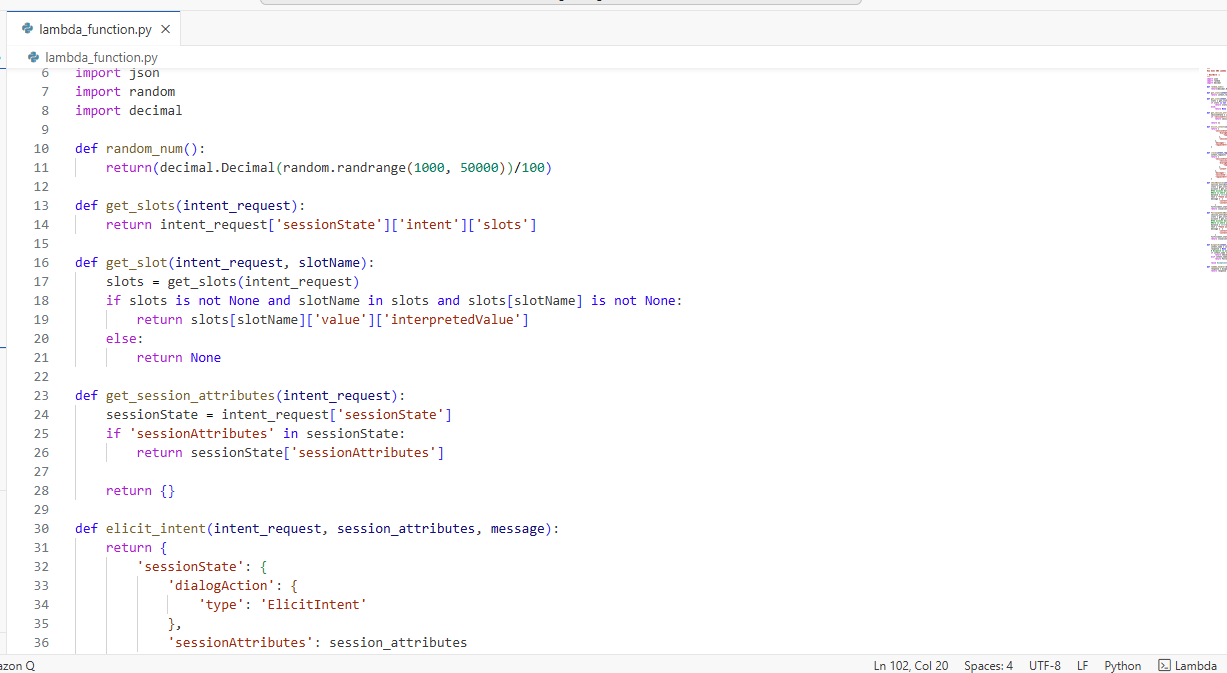
In this project, I created an AWS Lambda function to dynamically generate and return a random bank balance whenever a user asks for it via my Lex bankerBot chatbot.
How it works:
- When a user triggers the CheckBalance intent, Lex sends a request to the Lambda function.
- Lambda extracts the necessary slot values (like account type), and then uses Python’s
randomlibrary to generate a realistic-looking random balance. - The function then constructs a polite message—e.g., “Thank you. The balance on your savings account is $1234.56 dollars.”—and sends it back to Lex, which displays it to the user.
- Lambda handles the backend logic (“Don’t worry, I’ve got your back(end)!”), allowing Lex to focus on chatting with users rather than crunching numbers.
Summary:
AWS Lambda powers my chatbot’s ability to respond with dynamic, on-the-fly information. It lets me extend Lex beyond static messages, making the chatbot interactive and seemingly “smart” by calculating (mock) bank.
Chatbot Alias
Aliases in Amazon Lex act like pointers or shortcuts to a particular version of your chatbot.
When integrating Lex with other AWS services or your custom apps, you connect those resources to an alias instead of a specific version.
Why is this useful?
- If you publish a new bot version (with improved logic, new features, etc.), you don’t have to update every client/app configuration.
- You simply switch the alias to the new version—and instantly all clients/apps start using the latest bot.
- This process saves time and reduces mistakes, because every app always connects via the alias, not the underlying version.
Summary:
Aliases make bot version management simple, safe, and flexible when you need to evolve your chatbot without lots of manual updates!
TestBotAlias is a default version of my bot that's made for testing or development.
This is the playground version of my bot that I will use to make sure everything works smoothly before rolling out changes!
To connect Lambda with my BankerBot, I went to my bot’s TestBotAlias and, under the Languages panel, clicked English (US). A Lambda function panel appeared, which allowed me to associate my Lambda function with this specific TestBotAlias version of my bot.
For Source, I selected my Lambda function (BankingBotEnglish)—the one I just created using the Python code.
I left the Lambda function version or alias field at the default $LATEST, so it always uses the most up-to-date code for the function.
This setup means that whenever my bot receives a user request requiring backend logic (like checking a balance), it will call the BankingBotEnglish Lambda function behind the scenes, providing fast, dynamic responses for the user!

Code Hooks
A code hook in Amazon Lex is a connection point where you can plug in a custom AWS Lambda function to execute additional logic whenever your chatbot reaches a certain stage in the conversation.
Here’s what code hooks do:
- Trigger your Lambda function during the dialog, fulfillment, or initialization phase of an intent.
- Let your chatbot perform dynamic tasks that go beyond simple intent matching, such as:
- Querying a backend database (e.g., to check a bank balance).
- Validating user input.
- Customizing responses based on context or history.
- Making decisions based on the user's previous requests.
Why use code hooks?
- They make your bot smarter and more flexible, allowing it to interact with real data, apply business logic, or personalize the conversation.
- They enable you to extend your chatbot well beyond static and rule-based messages, making it truly interactive and powerful.
Even though I already connected my Lambda function with my chatbot’s alias, I had to use code hooks because code hooks are what actually tell Lex when and how to use Lambda during the conversation.
Aliases link the overall bot version with Lambda, but code hooks specify exactly which intents or steps in the dialog should trigger Lambda. Without code hooks, Lex wouldn’t know when to call Lambda or what task Lambda should perform for the user. Code hooks activate Lambda for custom logic at the right moments, enabling the chatbot to collect slots, validate inputs, perform calculations, or generate dynamic responses—like retrieving a bank balance—making the conversation truly interactive and smart!
I configure a code hook for my chatbot at the specific intent I want to trigger Lambda—for example, the CheckBalance intent.
Here’s where I find and set it up:
- Go to the intent I want to use (e.g., CheckBalance).
- Open the Fulfilment panel.
- In the “On successful fulfilment” bubble, select the option to use Lambda.
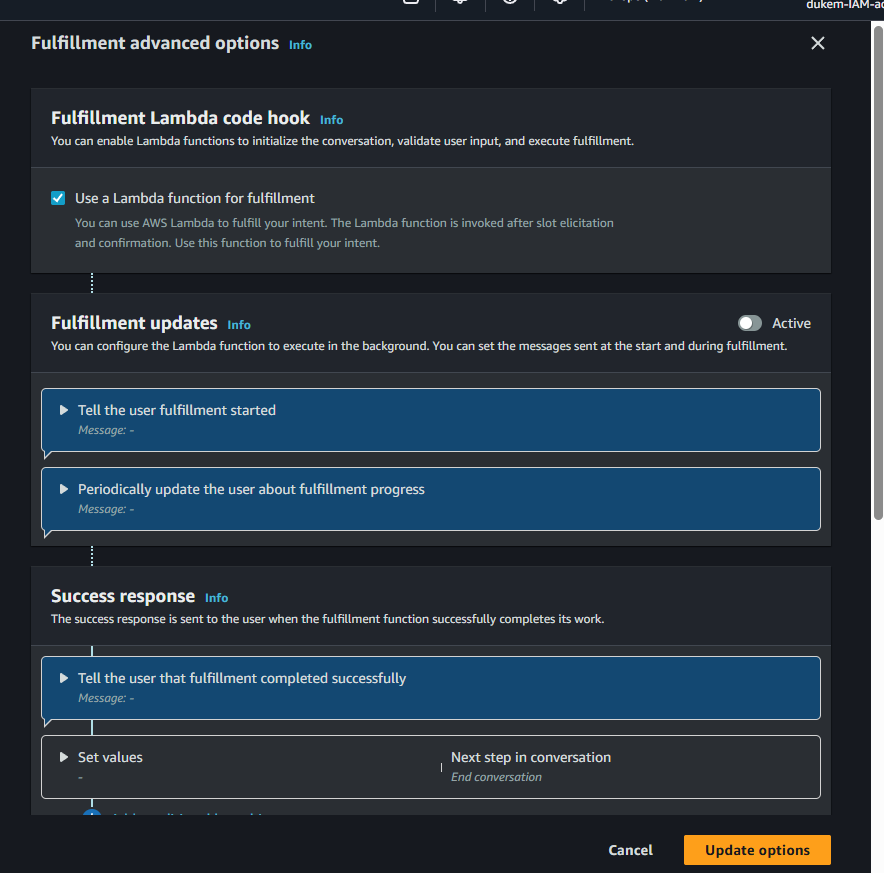
- Click Advanced options to reveal more configuration settings.
- Under the Fulfilment Lambda code hook panel, check the box labeled “Use a Lambda function for fulfilment.”
- Select or confirm my Lambda function as the handler.
This tells Lex to call my Lambda function when this intent is successfully fulfilled!
It’s a targeted way to make my bot do custom backend work (like providing a bank balance) only on the intents where it’s needed.
The final result!
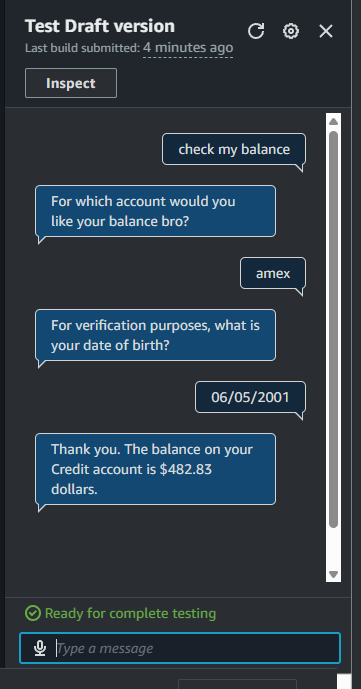
I've set up my chatbot to return a bank balance figure when the user provides both their date of birth and account type.
Once these required slot values are filled in the conversation, Lex triggers the Lambda function. Lambda then generates a random dollar amount and sends it back to the user as their account balance. This ensures the bot only returns a (mock) bank balance after collecting the necessary information to "verify" the request, making the interaction feel more secure and realistic.
Customizing the Lambda function
To enhance the connection between Lambda and Lex, I updated the CheckBalance function in my source code. Specifically, I replaced the standard response line with a dynamic message generator. I added a list of playful account descriptions, randomly selected one, and used it in the response. Now, instead of the basic message, the chatbot says something like: "Hello! Your savings account balance, tucked away in Dukem's top-secret digital vault, is currently 218.45 euros." This change makes the bot's reply more engaging, personalized, and fun for users.
Now, the message my users see when they ask for their bank balance is a playful and personalized response like, “Hello! Your checking account balance, tucked away in your personal treasure box, is currently 1534.67 euros.” I can customize this message even further by adding more creative descriptions, tailoring responses to specific user data, or including transaction highlights to make the conversation even more engaging and relevant for each user.
