Add Custom Slots to a Lex Chatbot
Project Link: View Project
Author: Duc Thai
Email: ducthai060501@gmail.com
Add Custom Slots to a Lex Chatbot
Introducing Today's Project!
In today’s project, I used Amazon Lex to design, build, and deploy my own custom chatbot. I set up conversational flows to collect user details—specifically, their birthday and bank account type—by defining custom intents and using slots. Lex handled understanding user input, prompting for missing information, validating responses, and managing errors with fallback and failure messages. I also customized slot types and slot prompts to make interactions more natural and user-friendly. Overall, Amazon Lex enabled me to create a chatbot that can gather necessary information efficiently and respond intelligently to users, helping automate tasks like checking a bank balance.
What is Amazon Lex?
Amazon Lex is a fully managed artificial intelligence service from AWS that lets you design, build, and deploy conversational interfaces—like chatbots—using both voice and text. Lex combines advanced natural language understanding (NLU) and automatic speech recognition (ASR), empowering developers to create chatbots that accurately comprehend and respond to user input.
It is useful because:
- It makes building sophisticated, natural, human-like conversational experiences quick and easy, without needing deep AI expertise.
- Lex handles all the complexity of speech and language recognition, letting you focus on your bot’s logic and user experience.
- It integrates with other AWS services (like Lambda, S3, etc.) so your chatbot can securely manage data, trigger workflows, and scale automatically.
- You can capture information using slots, customize responses, and validate inputs, ensuring efficient, friendly and accurate conversations.
One thing I didn't expect in this project was...
One thing I didn't expect in this project was how flexible and intelligent Amazon Lex is at capturing user information, especially with custom slots. I was surprised that the chatbot could accurately recognize various ways people mention their account type or birthday in a sentence, even if their phrasing wasn’t a perfect match to my examples. It made the conversation flow much more naturally than I expected and reduced the need for repeated prompts or clarification. Seeing Lex automatically extract slot values and handle user messages dynamically was a highlight I hadn’t anticipated!
This project took me...
This project took me 40 minutes to complete.
Slots
Slots are pieces of information that a chatbot needs to complete a user's request. Think of them as blanks that need to be filled in a form.
For example, if the intent is to book a table at a restaurant, the chatbot needs specific details like: restaurant name, date, time, number of people.
Amazon Lex provides many ready-to-use slot types for common information, like dates and times, but you can also create your own custom slot types to fit your specific needs.
By adding custom slots in utterances, my chatbot’s users can interact in a much more natural, flexible way. They can simply say their request—including important details like account type or birthday—in one sentence, and the bot will instantly recognize and extract that information without needing extra prompts.
This means users:
- Spend less time answering repetitive questions, making conversations faster and smoother.
- Get a more human-like experience, since the chatbot understands details directly from what they say.
- Receive better, more accurate responses because the bot can capture exactly what’s needed right away.
- Feel empowered to communicate in their own words, instead of following rigid, step-by-step instructions.
Overall, custom slots make my chatbot quicker, smarter, and easier for users to work with!
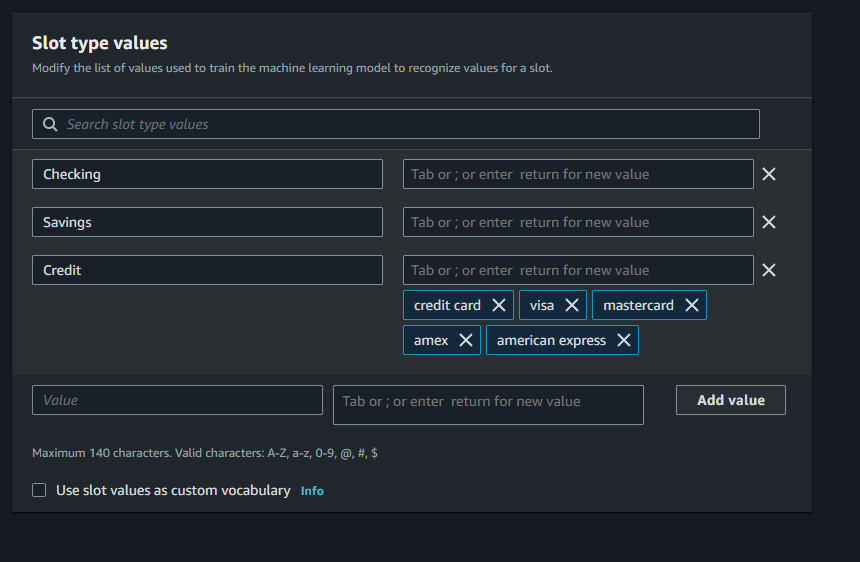
In this project, I created my first slot in Amazon Lex to record a user’s bank account type and save different bank account types that Lex should recognize, such as "checking", "savings", or "business".
I'm doing this because:
- It lets my chatbot guide the user through the conversation and accurately gather specific details that are necessary for fulfilling their request, in this case, checking a bank balance.
- Using slots helps my Bot know exactly what kind of account to look up, and by saving possible types, I ensure BankerBot can understand and validate responses, making the interaction clear and error-free for users.
- Slots also enable more dynamic chatbot design, as I can easily update or adjust supported account types without restructuring the entire bot, and help my bot prompt users with examples or suggestions.
This step is essential for setting up robust conversations and preparing my chatbot to handle a variety of real banking situations.
Connecting slots with intents
This slot type has restricted slot values, which means makes sure that only the values that you specify will count as a valid accountType!
Otherwise, Amazon Lex might use machine learning to accept other values that it frequently encounters from users.
In my case, I don't want Lex to use machine learning to accept other values. I have a set list of bank account types that I offer - Checking, Savings, and Credit accounts - and I don't offer any other bank account types.
If Lex starts accepting other values outside of these three, users could end up having conversations about bank account types I don't actually offer! To prevent that from happening, I'll restrict Lex to only acknowledge the bank account types I set up here.
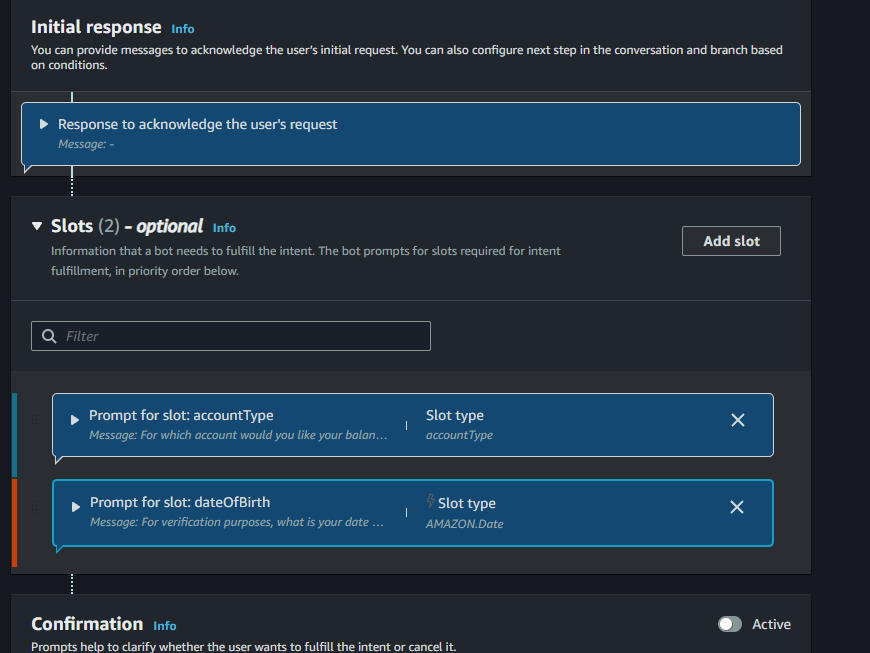
I associated my custom slot (accountType) with CheckBalance, which is designed to help users check the balance of a specific bank account type. When a user wants to know their account balance, this intent guides the conversation by asking for important details—such as the user’s account type (using the custom slot you set up) and other relevant information like their birthday.
By associating your custom slot (accountType) with the CheckBalance intent, my chatbot can:
- Prompt the user to specify which account (checking, savings, business, etc.) they want to check.
- Collect necessary information to identify the user and their account.
- Retrieve and display the balance for the chosen account type.
In summary, the CheckBalance intent focuses on gathering the details required to securely and accurately return the user’s account balance in a conversational way.
Slot values in utterances
I included slot values in some of the utterances for the CheckBalance intent by adding placeholders like {accountType} directly into the sample user inputs. For example:
- “What’s the balance in my {accountType} account?”
- “How much do I have in {accountType}?”
- “Balance in {accountType}”
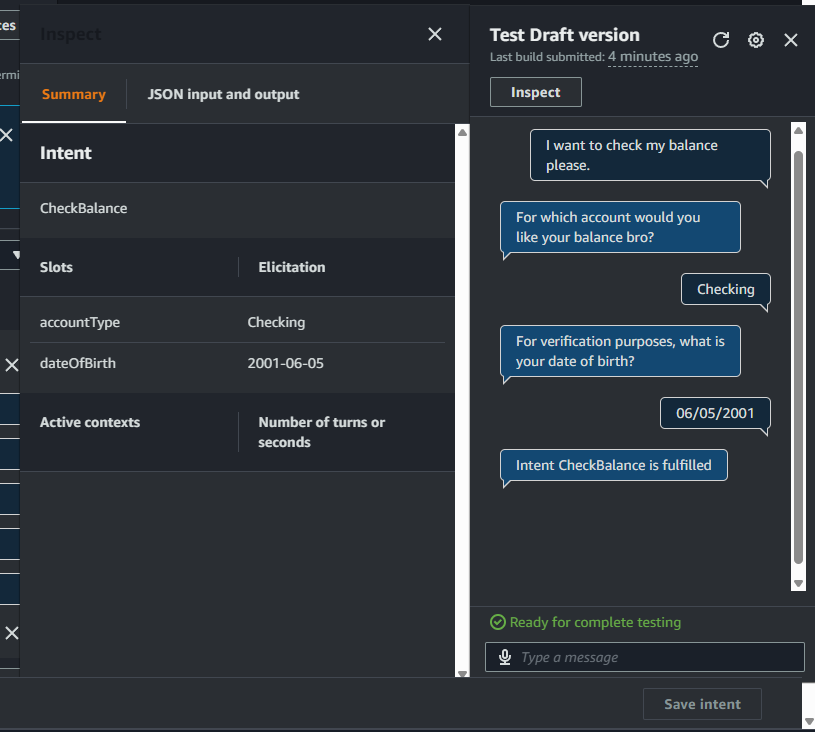
By doing this, I’ve told Amazon Lex to expect and extract slot values straight from the user’s message. So if a user says, “Show me my savings account balance,” Lex will recognize “savings” as the value for the accountType slot, fill it in automatically, and avoid needing to prompt for it. This makes conversations faster and feels more natural for the user, since Lex can capture necessary details right away!
Handling failures in slot values
I set up slot variations by creating multiple prompt messages for the dateOfBirth slot, so the chatbot can ask for the user’s date of birth in different ways. These variations include:
- “For verification purposes, what is your date of birth?”
- “Sorry, that wasn't clear to me. What's your date of birth?”
- “Bro I do not get it, say it again with proper format please.”
The messages play in order—so if a user’s response to the first prompt is invalid or doesn’t match the expected format, the bot will automatically use the next prompt to clarify and encourage the user to try again. This approach makes error handling feel conversational and less robotic!
By customizing Messages 2 and 3, I can let users know the bot didn’t quite understand, and gently prompt them to provide the info in the correct format—making the experience smoother and more human-like.
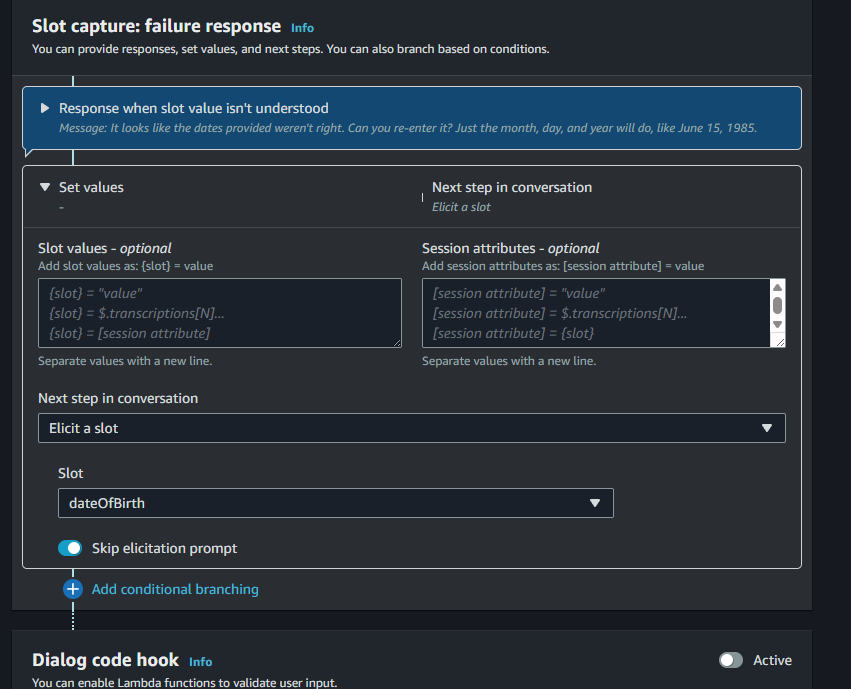
I set up failure responses by customizing the advanced settings for the dateOfBirth slot in my chatbot. By default, if a user answers incorrectly or gives an invalid response multiple times (like “cheese” or “i have no clue”), the bot cycles through all three slot prompt variations before moving on to a failure response.
After the failure response is triggered, Lex automatically switches to the FallbackIntent to provide a final error message.
A specific default setting I changed was in Advanced options under the dateOfBirth slot, in the Slot capture: failure response section. For “Next step in conversation,” I selected the Intent dropdown, then chose to Elicit a slot, and picked dateOfBirth as the slot. I also enabled the option to Skip elicitation prompt—this ensures my bot doesn’t repeat the date of birth question twice in a row, making the conversation smoother and less frustrating for the user.