Query Data with DynamoDB
Project Link: View Project
Author: Duc Thai
Email: ducthai060501@gmail.com
Query Data with DynamoDB
Introducing Today's Project!
What is Amazon DynamoDB?
Amazon DynamoDB is a fully managed NoSQL database service provided by AWS. It stores data in tables and allows fast, predictable performance at any scale.
It is useful because it can handle large amounts of data with low latency, automatically scales up or down based on demand, and provides high availability without needing you to manage servers, making it ideal for web apps, mobile apps, and real-time data workloads.
How I used Amazon DynamoDB in this project
In today’s project, I used Amazon DynamoDB to create multiple tables, load data into them using AWS CloudShell, query the tables using partition and sort keys, and perform a transaction that updated two related tables at once. This let me explore how DynamoDB handles structured and related data efficiently while ensuring data consistency.
One thing I didn't expect in this project was...
One thing I didn't expect in this project is how important data modeling is in DynamoDB. Designing tables with the right partition and sort keys, and understanding how related tables interact, is crucial for efficient queries, fast performance, and maintaining data consistency across transactions.
This project took me...
This project took me 80 minutes.
Querying DynamoDB Tables
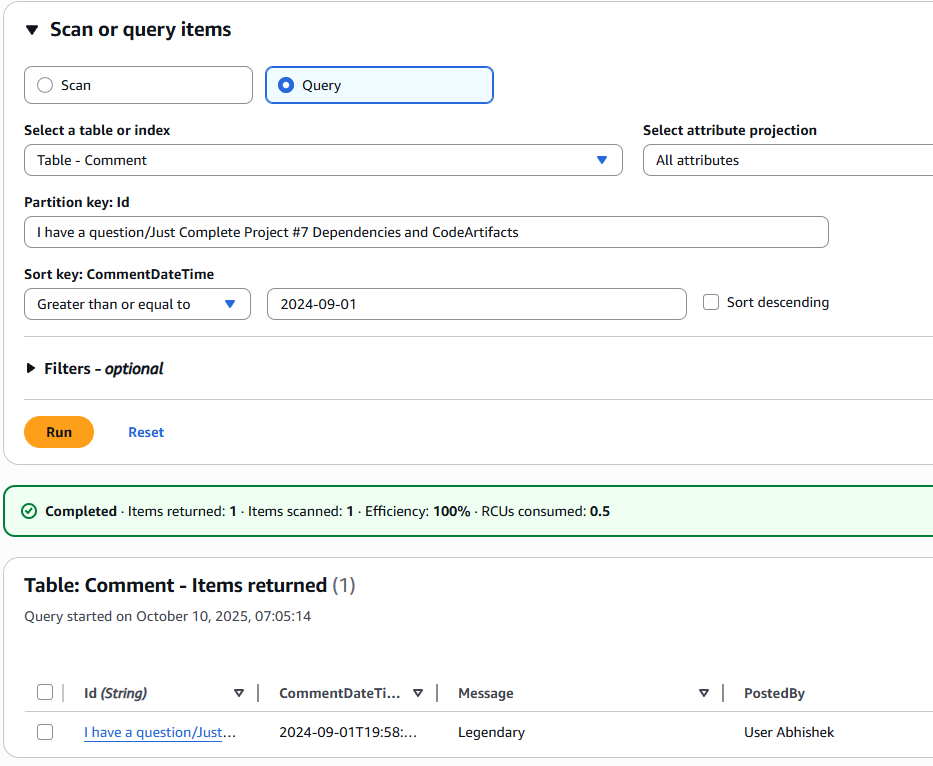
A partition key is a unique identifier for each item in a DynamoDB table that determines how the data is distributed across storage partitions.
It is used to quickly locate and retrieve items. Every item in the table must have a value for the partition key. If the table also has a sort key, the combination of partition key and sort key must be unique for each item.
In short, the partition key helps organize, store, and efficiently access data in DynamoDB.
A sort key is an optional second part of a DynamoDB table's primary key that allows multiple items to share the same partition key.
It is used to order and organize items that have the same partition key, making it possible to query ranges of items or retrieve them in a specific order.
In short, the combination of partition key + sort key must be unique, and the sort key helps store related items together and query them efficiently.
Limits of Using DynamoDB
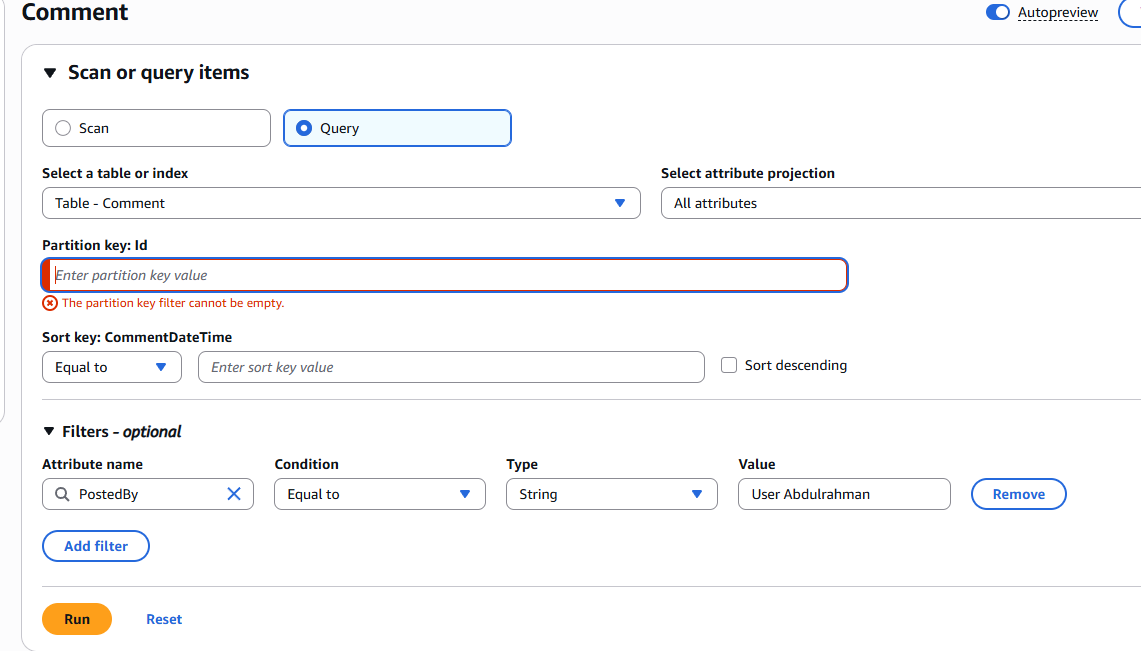
I ran into an error because I tried to query all comments by User Abdulrahman without specifying the partition key (Id). In DynamoDB, queries must include the partition key—you cannot leave it empty. Filters like PostedBy = User Abdulrahman can only narrow results after the partition key is used, so the query failed until I included the correct partition key.
Insights we could extract from our Comment table include:
Which comments belong to which questions or topics (using the partition key: Id).
The order of comments for each question over time (using the sort key: CommentDateTime).
Who posted comments and when, for specific questions or discussions.
Insights we can't easily extract from the Comment table include:
All comments made by a specific user across all questions, because DynamoDB queries require the partition key.
Aggregated statistics across multiple partitions, like total comments per user or most active users, without extra processing or secondary indexes.
Full-text search or keyword-based filtering within messages directly.
Running Queries with CLI
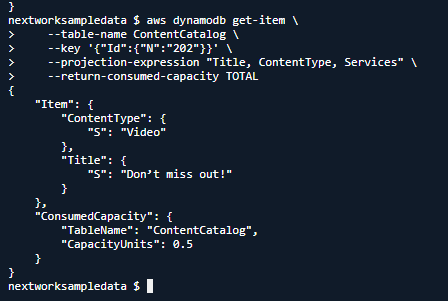
A query I ran in CloudShell was '
aws dynamodb get-item
--table-name ContentCatalog
--key '{"Id":{"N":"202"}}'
--projection-expression "Title, ContentType, Services"
--return-consumed-capacity TOTAL
'
This will fetch the item from the ContentCatalog table with Id = 202, but it will only return the Title, ContentType, and Services attributes. It will also show the total read capacity units consumed to retrieve this item. Since Id is the partition key, the query is efficient and targets a single item directly.
Query options I could add to my query are:
--consistent-read : I want a strongly consistent read.
--projection-expression: I only want to know some of the item's attributes.
--return-consumed-capacity : I want to know how much capacity was consumed by the request.
Transactions
A transaction is which is a group of operations that all have to succeed - if any of the operations in the group fails, none of the changes get applied. This makes sure that any change to your database is consistent across all your tables!
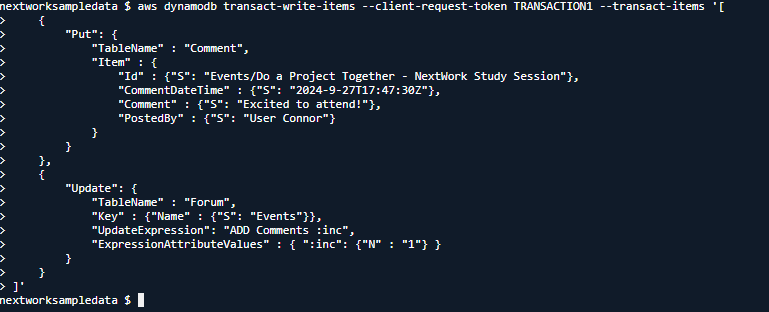
I ran a transaction using aws dynamodb transact-write-items: that did two things atomically:
Added a new comment "Excited to attend!" by "User Connor" under "Events/Do a Project Together - NextWork Study Session" in the Comment table with a timestamp.
Updated the Forum table by incrementing the Comments count for "Events" by 1 to keep it in sync with the actual comments.
Using a transaction ensures both actions succeed or fail together, maintaining data consistency across the tables.