🚀 AWS CodeDeploy Automated Deployment Excellence - Advanced Web Application Deployment Project

A comprehensive AWS CodeDeploy project demonstrating advanced automated deployment strategies, infrastructure provisioning, and enterprise-grade continuous delivery implementation. This intensive project showcases sophisticated CodeDeploy configuration, deployment script automation, rollback mechanisms, and comprehensive disaster recovery using cutting-edge AWS services and deployment best practices for reliable, scalable, and efficient application delivery automation.
Project Link: View Project
Author: Duc Thai
Email: ducthai060501@gmail.com
Duration: 3 hours
Difficulty Level: Advanced Continuous Deployment and DevOps Automation
🎯 Project Vision and Continuous Deployment Excellence
This advanced CodeDeploy project represents a comprehensive transformation of manual deployment processes into automated, enterprise-grade continuous delivery systems that eliminate human error, minimize downtime, and ensure consistent application rollouts. The primary objective involves establishing sophisticated automated deployment pipelines with comprehensive error handling, rollback mechanisms, and disaster recovery capabilities essential for modern software delivery operations and DevOps excellence.
Strategic Continuous Deployment Transformation Objectives:
- 🚀 Complete Deployment Automation - Transform manual deployment processes into automated, repeatable delivery workflows
- 🛡️ Infrastructure as Code Excellence - CloudFormation-based infrastructure provisioning with automated resource management
- 📋 Advanced Deployment Scripting - Sophisticated deployment script automation for consistent environment configuration
- 🔄 Rollback and Recovery Systems - Comprehensive disaster recovery mechanisms ensuring deployment safety
- 🎯 Zero-Downtime Deployment - Advanced deployment strategies minimizing service interruption
- 📊 Deployment Monitoring Excellence - Real-time deployment tracking and comprehensive status reporting
Continuous Deployment Excellence Focus: Every automation component represents improved reliability, consistency, and operational efficiency, making sophisticated deployment practices essential for enterprise-grade software delivery and automated operations management.
🛠️ Advanced AWS CodeDeploy Technologies and Deployment Architecture
Enterprise Continuous Deployment Technology Stack
- AWS CodeDeploy - Fully managed deployment service enabling automated application rollouts
- AWS CloudFormation - Infrastructure as Code service for automated resource provisioning
- AWS EC2 - Elastic compute instances serving as deployment targets
- AWS S3 - Object storage for build artifacts and deployment packages
- AWS IAM - Identity and access management with fine-grained deployment permissions
- CodeDeploy Agent - Instance-level deployment orchestration and management
- Apache Tomcat - Java web application server for application hosting
- Apache HTTPD - Web server for traffic handling and load balancing
Critical Continuous Deployment Concepts and Practices Mastered
- 🚀 Automated Deployment Pipelines - Complete deployment automation from artifact to production
- 📋 Deployment Script Excellence - Sophisticated shell scripting for environment configuration
- 🔄 AppSpec Configuration Mastery - Advanced deployment specification with lifecycle hooks
- 🛡️ Disaster Recovery Implementation - Comprehensive rollback mechanisms and error handling
- 🎯 Deployment Strategy Optimization - Multiple deployment configuration patterns for different scenarios
- 📊 Infrastructure Tagging - Resource organization and deployment targeting through intelligent tagging
- 🔒 Security Integration - IAM role-based access control for secure deployment operations
💡 Project Implementation Structure and Advanced Deployment Methodology
Implementation Phases:
- Infrastructure Provisioning - CloudFormation-based EC2 and VPC deployment with automated configuration
- Deployment Script Development - Comprehensive shell script creation for application lifecycle management
- AppSpec Configuration - Advanced deployment specification with multi-phase lifecycle hooks
- CodeDeploy Service Setup - Application and deployment group configuration with IAM integration
- Deployment Execution - Automated deployment testing with comprehensive validation
- Disaster Recovery Testing - Intentional failure testing and rollback mechanism validation
Advanced Deployment Configuration Components:
- Deployment Applications - Logical containers for deployment group and configuration management
- Deployment Groups - Target instance collections with deployment strategy configuration
- Deployment Configurations - Rollout strategy settings (AllAtOnce, HalfAtATime, OneAtATime)
- Revision Management - S3-based artifact versioning and deployment package management
- IAM Service Roles - Secure permissions for CodeDeploy service operations
- Instance Tagging - Resource identification and deployment targeting through metadata
🏗️ Advanced Infrastructure Provisioning and CloudFormation Excellence
Infrastructure as Code Implementation Strategy
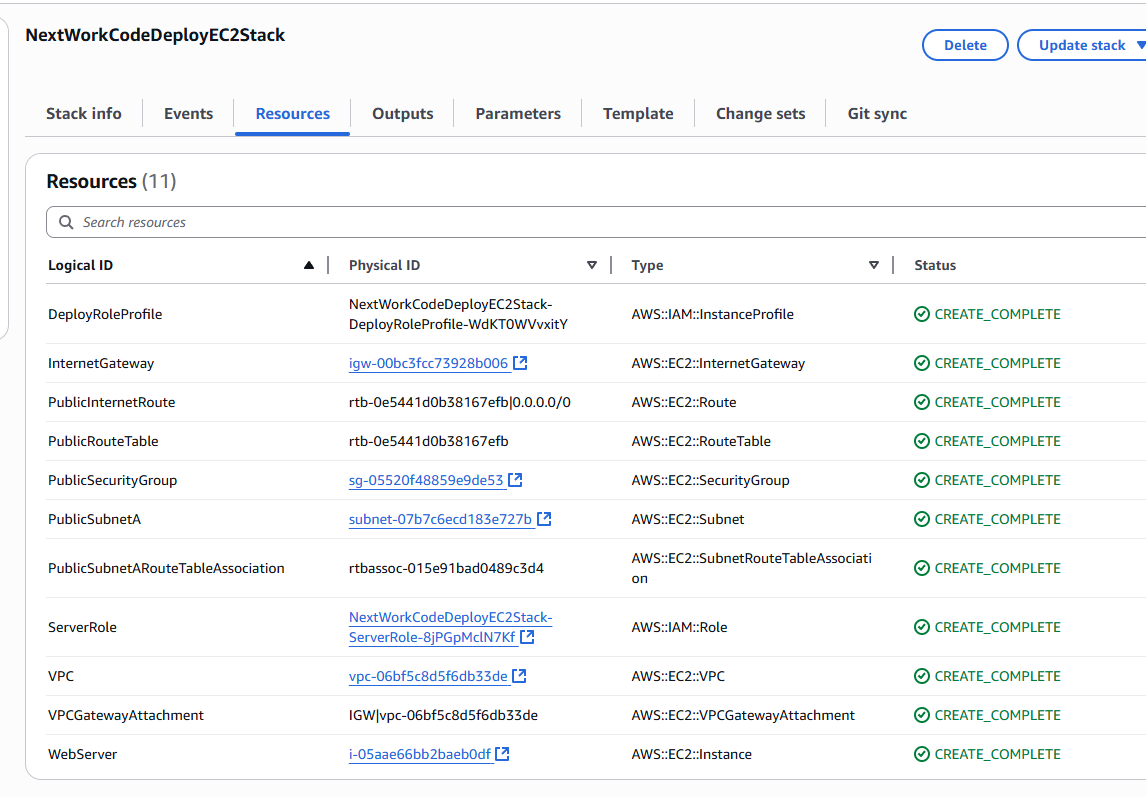
The infrastructure provisioning demonstrates sophisticated CloudFormation usage for automated, repeatable deployment environment creation, eliminating manual configuration and ensuring consistent resource provisioning across multiple environments.
CloudFormation Deployment Benefits:
- 🔄 Automated Resource Provisioning - Complete infrastructure deployment through code-based configuration
- 🛡️ Rollback Protection - "Delete all newly created resources during rollback" setting ensuring clean resource management
- 📋 Consistent Environment Creation - Repeatable infrastructure patterns across development, staging, and production
- 🎯 Resource Organization - Logical grouping of related resources for comprehensive lifecycle management
- 💰 Cost Optimization - Automatic resource cleanup preventing orphaned infrastructure costs
Comprehensive Infrastructure Components
CloudFormation Template Resources:
- 🌐 VPC Configuration - Virtual private cloud with security and network isolation
- 📡 Networking Components - Subnets, internet gateways, and route tables for connectivity
- 🔒 Security Groups - Fine-grained firewall rules controlling instance access
- 🖥️ EC2 Instances - Compute resources configured for web application hosting
- 👤 IAM Roles - Service roles for CodeDeploy and EC2 instance permissions
- 🏷️ Resource Tagging - Metadata assignment for resource organization and deployment targeting
Infrastructure Design Advantages:
- ⚡ Rapid Environment Creation - Complete deployment infrastructure provisioned in minutes
- 🔒 Security Best Practices - Network isolation and principle of least privilege implementation
- 📊 Resource Tracking - Comprehensive tagging for cost allocation and resource management
- 🛠️ Maintenance Efficiency - CloudFormation stack updates for infrastructure modifications
📋 Advanced Deployment Script Development and Automation Excellence
Comprehensive Deployment Script Architecture
The deployment script development demonstrates sophisticated understanding of application lifecycle management, server configuration automation, and error handling essential for enterprise-grade deployment operations.
Script Development Philosophy: Deployment scripts serve as automated programs executing sequential commands that eliminate manual intervention, reduce human error, and ensure consistent environment configuration across all deployment targets.
Install Dependencies Script (install_dependencies.sh)
This critical script establishes the complete software environment required for web application hosting, implementing comprehensive dependency installation and configuration.
Installation Components:
- ☕ Apache Tomcat Installation - Java web application server for WAR file deployment
- 🌐 Apache HTTPD Configuration - Web server for HTTP request handling and traffic management
- ⚙️ Service Integration - Inter-service communication configuration between Tomcat and HTTPD
- 📂 Directory Structure Creation - Application deployment directories and permission configuration
- 🔒 Security Configuration - Service user permissions and access control implementation
Server Lifecycle Management Scripts
Start Server Script (start_server.sh):
- 🚀 Service Initialization - Tomcat and Apache HTTPD startup automation
- 🔄 Boot Configuration - Service enabling for automatic startup after system reboot
- 📊 Status Validation - Service health checks and startup confirmation
- 🛡️ Reliability Assurance - Automated service recovery and high availability configuration
Stop Server Script (stop_server.sh):
- 🔍 Process Detection - pgrep-based service discovery and status verification
- 🛑 Graceful Shutdown - Controlled service termination preventing data corruption
- ⚠️ Error Prevention - Conditional execution preventing unnecessary stop command errors
- 📋 Status Reporting - Shutdown confirmation and process validation
Advanced Script Features:
#!/bin/bash
set -e  # Exit on any error

# Check if service is running before stopping
if pgrep -x "httpd" > /dev/null; then
    sudo systemctl stop httpd.service
    echo "Apache HTTPD stopped successfully"
else
    echo "Apache HTTPD is not running"
fi

# Tomcat service management with error handling
if pgrep -f "tomcat" > /dev/null; then
    sudo systemctl stop tomcat.service
    echo "Tomcat stopped successfully"
else
    echo "Tomcat is not running"
fi
📝 Advanced AppSpec.yml Configuration and Deployment Lifecycle Management
AppSpec Configuration Architecture
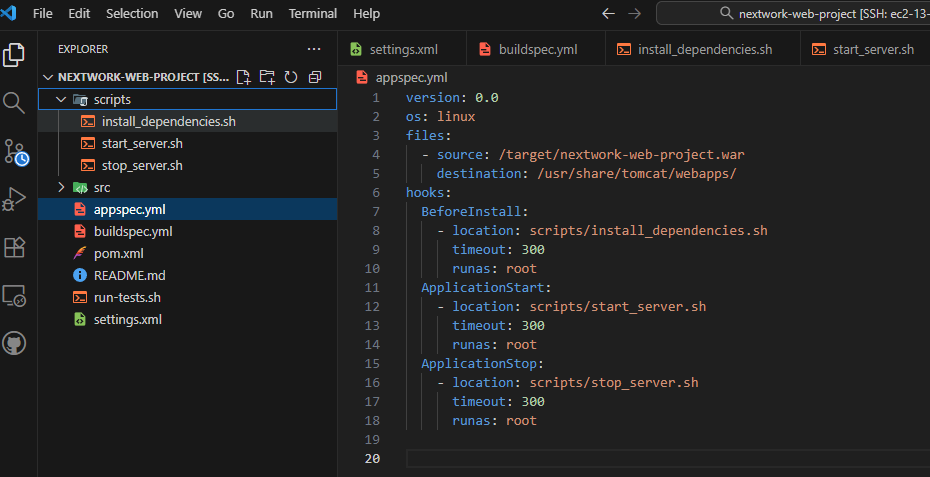
The appspec.yml file serves as the deployment blueprint, defining comprehensive deployment instructions that CodeDeploy executes during application rollout, including file management, script execution, and lifecycle event coordination.
AppSpec Configuration Structure:
version: 0.0
os: linux

files:
  - source: target/nextwork-web-project.war
    destination: /usr/share/tomcat/webapps/

hooks:
  BeforeInstall:
    - location: scripts/install_dependencies.sh
      timeout: 300
      runas: root

  ApplicationStart:
    - location: scripts/start_server.sh
      timeout: 300
      runas: root

  ApplicationStop:
    - location: scripts/stop_server.sh
      timeout: 300
      runas: root
Deployment Lifecycle Hooks Excellence
BeforeInstall Hook:
- 🏗️ Environment Preparation - Dependency installation and system configuration
- ⚙️ Service Setup - Tomcat and Apache installation with configuration
- 📂 Directory Creation - Application directory structure and permissions
- 🔒 Security Configuration - User permissions and access control setup
ApplicationStart Hook:
- 🚀 Service Startup - Tomcat and Apache service initialization
- 🔄 Automatic Boot Configuration - Service persistence across system restarts
- 📊 Health Validation - Service startup verification and status confirmation
- ⚡ Performance Optimization - Service configuration and performance tuning
ApplicationStop Hook:
- 🛑 Graceful Service Shutdown - Controlled service termination preventing data loss
- 🔍 Process Validation - Service status checks before shutdown attempts
- ⚠️ Error Prevention - Conditional execution preventing shutdown errors
- 📋 Status Reporting - Shutdown confirmation and process cleanup
BuildSpec Integration and Artifact Management
Enhanced BuildSpec.yml Configuration:
artifacts:
  files:
    - target/nextwork-web-project.war
    - appspec.yml
    - scripts/**/*
  discard-paths: no
Artifact Integration Benefits:
- 📦 Complete Deployment Package - WAR file, deployment specification, and scripts bundled together
- 🔄 Version Consistency - All deployment components versioned together ensuring compatibility
- 📋 Deployment Completeness - CodeDeploy receives everything needed for successful deployment
- 🎯 Path Preservation - Script directory structure maintained in deployment package
🔧 Advanced CodeDeploy Service Configuration and Deployment Strategy Excellence
CodeDeploy Application and Deployment Group Architecture
The CodeDeploy service configuration demonstrates sophisticated understanding of deployment orchestration, target management, and deployment strategy implementation for enterprise-grade application delivery.
CodeDeploy Component Hierarchy:
- 📱 CodeDeploy Application - Top-level logical container representing the deployable application
- 👥 Deployment Groups - Collections of deployment targets with specific configuration settings
- ⚙️ Deployment Configurations - Strategy definitions controlling rollout patterns and timing
- 📦 Revisions - Versioned application packages stored in S3 for deployment
IAM Security Implementation and Access Control
The IAM role configuration enables CodeDeploy service operations while maintaining security best practices and principle of least privilege access control.
CodeDeploy Service Role Permissions:
- 🖥️ EC2 Instance Access - Deployment target management and application installation
- 📦 S3 Artifact Retrieval - Build artifact download from S3 buckets
- 📊 Auto Scaling Integration - Auto Scaling group deployment coordination
- 📝 CloudWatch Logging - Deployment status and progress logging
- 🏷️ Resource Tagging - Instance identification and deployment targeting
Resource Tagging Strategy and Deployment Targeting
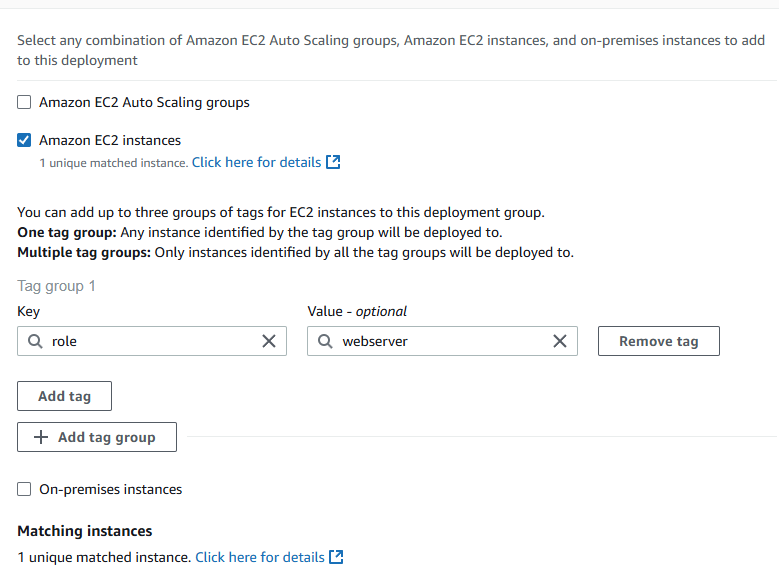
Strategic Tagging Implementation:
- 🏷️ Tag Key-Value Pairs - "role": "webserver" for precise deployment targeting
- 🎯 Automatic Instance Discovery - CodeDeploy automatically identifies tagged deployment targets
- 📋 Resource Organization - Logical grouping for management and automation
- 🔄 Deployment Isolation - Environment-specific deployments through tag-based filtering
- 📊 Operational Visibility - Resource tracking and inventory management
🎯 Advanced Deployment Configuration Strategies and CodeDeploy Agent Excellence
Deployment Configuration Strategy Analysis
The deployment configuration selection demonstrates advanced understanding of rollout strategies, risk management, and performance optimization essential for different deployment scenarios and operational requirements.
Deployment Configuration Options:
🚀 CodeDeployDefault.AllAtOnce:
- Strategy - Simultaneous deployment to all target instances
- Benefits - Fastest deployment completion with minimal complexity
- Risks - Complete service impact if deployment failures occur
- Use Cases - Development environments and low-risk production deployments
⚡ CodeDeployDefault.HalfAtATime:
- Strategy - Deployment to 50% of instances, then remaining instances
- Benefits - Balanced approach between speed and risk mitigation
- Risks - Partial service capacity during deployment phases
- Use Cases - Medium-risk production environments with load balancing
🛡️ CodeDeployDefault.OneAtATime:
- Strategy - Sequential deployment to individual instances
- Benefits - Maximum safety with minimal downtime risk
- Risks - Slower deployment completion requiring extended maintenance windows
- Use Cases - High-availability production systems requiring zero downtime
CodeDeploy Agent Architecture and Instance Management
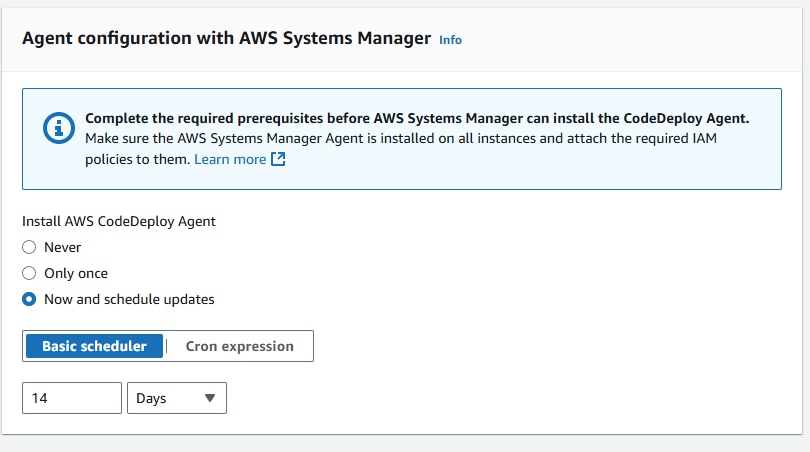
The CodeDeploy Agent serves as the critical component enabling communication between AWS CodeDeploy service and EC2 instances, orchestrating deployment execution and status reporting.
CodeDeploy Agent Responsibilities:
- 📡 Service Communication - Bi-directional communication with AWS CodeDeploy service
- 📦 Artifact Management - Application package download and extraction
- 📋 Script Execution - Deployment script orchestration and lifecycle management
- 📊 Status Reporting - Real-time deployment progress and completion status
- 🔄 Event Coordination - Lifecycle hook execution and error handling
Agent Installation Benefits:
- 🔄 Automated Deployment Execution - Seamless deployment process without manual intervention
- 📊 Real-Time Monitoring - Continuous deployment status tracking and reporting
- 🛡️ Reliability Enhancement - Managed deployment process with error detection
- ⚡ Performance Optimization - Efficient resource utilization during deployments
✅ Deployment Success Validation and Revision Management Excellence
Deployment Execution and Validation Process
The successful deployment execution demonstrates comprehensive understanding of deployment orchestration, revision management, and application validation essential for production-ready continuous delivery operations.
Deployment Process Components:
🚀 Deployment Creation:
- Application Version Selection - Specific artifact revision for deployment
- Target Group Configuration - Deployment group selection with instance targeting
- Strategy Implementation - Deployment configuration application (AllAtOnce selected)
- Revision Location Specification - S3 bucket and artifact path configuration
📋 Deployment vs Deployment Group Distinction:
- Deployment Group - Persistent configuration container with deployment settings and target specifications
- Deployment - Specific deployment event with unique ID, artifact version, and execution history
- Configuration Persistence - Deployment groups maintain settings across multiple deployment executions
- Historical Tracking - Individual deployments provide versioned deployment history and status
Revision Location Configuration and Artifact Management
S3 Revision Management:
- 📦 Artifact Storage - WAR files and deployment scripts stored in versioned S3 buckets
- 📋 Package Retrieval - CodeDeploy downloads complete deployment packages from configured S3 locations
- 🔄 Version Control - Artifact versioning enabling rollback to previous application versions
- 🔒 Access Control - IAM permissions controlling artifact access and deployment authorization
Application Validation and Success Confirmation
Deployment Validation Process:
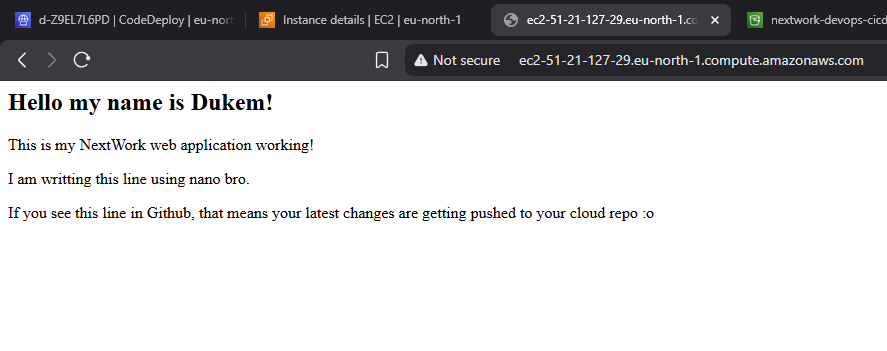
- 🌐 Public DNS Access - EC2 instance public DNS resolution and HTTP connectivity
- 📱 Application Accessibility - Web application functionality and user interface validation
- ⚡ Service Functionality - Tomcat and Apache service operation confirmation
- 📊 Deployment Status - CodeDeploy console success status and completion verification
Success Indicators:
- ✅ HTTP Response Success - Web application responds correctly to browser requests
- 🎯 Service Integration - Apache HTTPD and Tomcat coordination functioning properly
- 📦 File Deployment - WAR file correctly deployed to Tomcat webapps directory
- 📋 Script Execution - All deployment scripts completed successfully without errors
🛡️ Advanced Disaster Recovery Testing and Rollback Mechanism Excellence
Intentional Failure Testing Strategy
The disaster recovery implementation demonstrates sophisticated understanding of deployment safety mechanisms, error handling, and rollback strategies essential for production deployment confidence and operational reliability.
Deliberate Error Introduction:
#!/bin/bash
set -e  # Exit immediately on any error

# Intentional typo: systemctll instead of systemctl
sudo systemctll stop httpd.service  # This will fail

# Explicit failure exit
exit 1
Error Testing Objectives:
- 🚨 Failure Detection Validation - Verify CodeDeploy correctly identifies script failures
- 🔄 Rollback Mechanism Testing - Evaluate automatic rollback functionality and effectiveness
- 📊 Error Reporting Analysis - Assess deployment failure logging and status reporting
- 🛡️ Recovery Process Validation - Test disaster recovery procedures and operational continuity
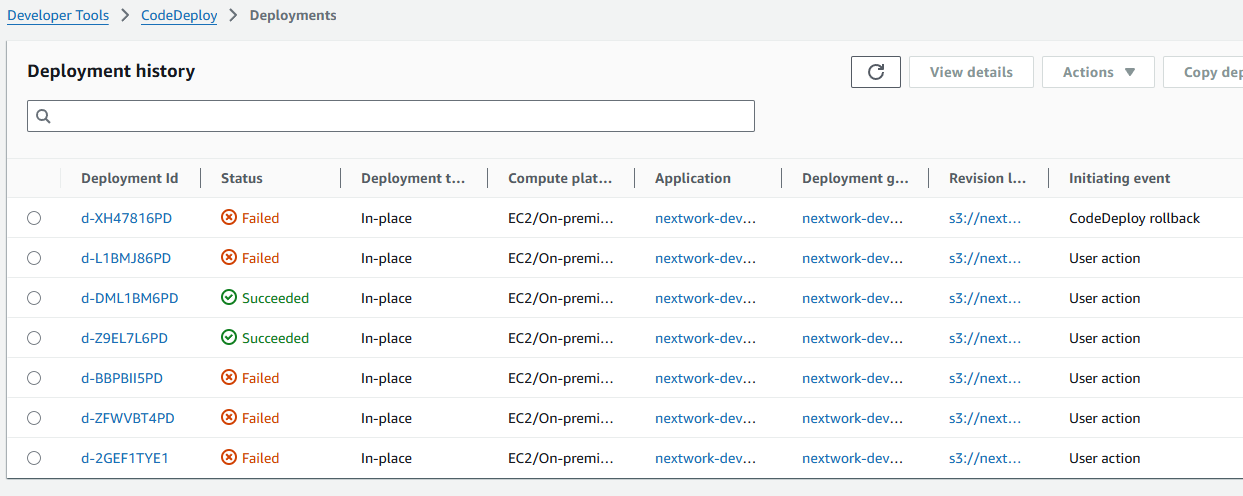
Rollback Mechanism Analysis and Limitations
The rollback testing revealed critical understanding of CodeDeploy rollback limitations and the importance of comprehensive deployment strategy design for production environments.
CodeDeploy Rollback Behavior Analysis:
- ⚙️ Configuration-Only Rollback - CodeDeploy reuses previous deployment configuration, not previous artifacts
- 📦 Artifact Limitation - Latest (potentially broken) artifact from S3 still deployed during rollback
- 🔄 Persistent Error Propagation - Broken scripts continue to cause failures in rollback attempts
- 🛠️ Manual Recovery Requirement - Script fixes and redeployment necessary for true recovery
Production Rollback Strategy and Best Practices
Enterprise Rollback Implementation:
- 🔧 AWS CodePipeline Integration - Automated rollback to specific, previously successful artifacts
- 📦 Artifact Retention Policies - Maintain multiple deployment package versions for rollback options
- 🎯 Reference-Based Rollbacks - Previous artifact version references for rapid recovery
- ⚡ Minimal Downtime Recovery - Pre-validated rollback procedures ensuring quick service restoration
Advanced Recovery Procedures and Cache Management
CodeDeploy Agent Cache Resolution:
# Complete deployment cache cleanup
sudo rm -rf /opt/codedeploy-agent/deployment-root/deployment-instructions/*
sudo rm -rf /opt/codedeploy-agent/deployment-root/deployment-group-id/*
sudo rm /usr/share/tomcat/webapps/nextwork-web-project.war
sudo service codedeploy-agent restart
Cache Management Benefits:
- 🔄 Clean Deployment State - Eliminate cached deployment artifacts and instructions
- 🛡️ Consistent Environment - Fresh deployment environment ensuring reliable execution
- 📋 Error Elimination - Remove previous deployment failures and corrupted cache data
- ⚡ Service Restoration - CodeDeploy Agent restart ensuring proper service operation
🎉 Project Success and Continuous Deployment Mastery Validation
Successfully Implemented Enterprise Deployment Pipeline
✅ Complete Infrastructure Automation - CloudFormation-based deployment environment with VPC, EC2, and security configuration
✅ Advanced Deployment Scripting - Comprehensive shell scripts for application lifecycle management
✅ AppSpec Configuration Excellence - Sophisticated deployment specification with lifecycle hooks
✅ CodeDeploy Service Integration - Application and deployment group configuration with IAM security
✅ Deployment Strategy Implementation - AllAtOnce configuration with comprehensive validation
✅ Artifact Management Success - S3-based revision control and deployment package management
✅ Disaster Recovery Validation - Intentional failure testing and rollback mechanism analysis
✅ Production Recovery Procedures - Cache management and agent restoration protocols
Advanced Continuous Deployment Engineering Skills Demonstrated
- CodeDeploy Service Mastery - Comprehensive understanding of automated deployment service configuration
- Infrastructure as Code Expertise - CloudFormation template development for deployment environments
- Deployment Script Excellence - Professional shell scripting for application lifecycle automation
- AppSpec Configuration Proficiency - Advanced deployment specification and lifecycle hook management
- Disaster Recovery Implementation - Rollback mechanism testing and recovery procedure development
- Security Integration Excellence - IAM role-based access control and deployment authorization
- Troubleshooting and Resolution - Systematic approach to deployment failure analysis and recovery
- Production Deployment Strategy - Enterprise-grade deployment configuration and validation
🔍 Critical Continuous Deployment Insights and Implementation Best Practices
Key CodeDeploy Development Learning Points
- Infrastructure First Approach - Establish complete deployment environment before application configuration
- Comprehensive Script Testing - Validate deployment scripts in isolated environments before production use
- Rollback Strategy Planning - Design artifact retention and rollback procedures from initial deployment design
- Cache Management Awareness - Understand CodeDeploy Agent caching behavior and cleanup procedures
- Error Handling Implementation - Include comprehensive error detection and reporting in deployment scripts
AWS CodeDeploy Best Practices and Advanced Techniques
- Use Infrastructure as Code - CloudFormation or Terraform for consistent deployment environment creation
- Implement Comprehensive Tagging - Resource organization and deployment targeting through metadata
- Design Defensive Scripts - Include error handling and status validation in all deployment scripts
- Enable Rollback Mechanisms - Configure automatic rollback with artifact retention strategies
- Test Disaster Recovery - Regular failure testing and recovery procedure validation
- Monitor Deployment Performance - CloudWatch integration for deployment tracking and optimization
- Implement Blue-Green Deployments - Advanced deployment strategies for zero-downtime releases
🚀 Advanced CodeDeploy Features and Enterprise Considerations
Enterprise Deployment Architecture Patterns
- Auto Scaling Integration - Deployment coordination with dynamic instance scaling
- Load Balancer Management - Traffic routing during deployments with health checks
- Multi-Region Deployments - Cross-region deployment strategies and disaster recovery
- Blue-Green Deployment Strategies - Zero-downtime deployment with instant rollback capabilities
- Canary Release Implementation - Gradual rollout with performance monitoring and validation
Advanced CodeDeploy Features and Capabilities
- Lambda Function Deployments - Serverless application deployment with traffic shifting
- ECS Service Deployments - Container application deployment with service management
- On-Premises Integration - Hybrid cloud deployment with on-premises server support
- Custom Deployment Configurations - Tailored rollout strategies for specific application requirements
- CloudWatch Alarms Integration - Automated rollback based on application performance metrics
📚 Advanced Continuous Deployment Learning Resources
AWS CodeDeploy Documentation
- AWS CodeDeploy User Guide
- CodeDeploy AppSpec File Reference
- CodeDeploy Configuration Options
- CodeDeploy Pricing and Cost Optimization
Continuous Deployment Best Practices
- AWS DevOps Blog - Deployment Articles
- AWS Well-Architected Reliability Pillar
- Continuous Delivery Best Practices
- AWS CodeDeploy Sample Applications
🤝 Project Impact and Professional Deployment Development
This AWS CodeDeploy Continuous Deployment project provided comprehensive, hands-on experience with enterprise-grade automated deployment implementation, infrastructure provisioning, and sophisticated rollback mechanisms essential for modern DevOps and software delivery operations. The intensive project showcased advanced skills in deployment automation, disaster recovery, and operational excellence critical for professional cloud engineering and continuous delivery roles.
Professional Development Impact: Successfully completing a comprehensive CodeDeploy deployment project demonstrates essential skills for DevOps engineers, cloud architects, deployment engineers, and automation specialists. The project combines technical implementation expertise with deployment best practices, providing practical experience directly applicable to enterprise deployment roles and automated delivery specializations.
Technical Achievement Significance: The systematic implementation of automated deployment pipelines and successful integration of infrastructure provisioning, script automation, and disaster recovery demonstrates advanced understanding of continuous delivery practices and enterprise deployment operations. The ability to create sophisticated deployment workflows while maintaining reliability and operational excellence shows mastery of professional deployment engineering and automated application delivery.
Career Development Value: This project addresses real-world continuous deployment challenges faced by organizations implementing automated software delivery and operational resilience. The demonstrated ability to implement sophisticated deployment systems, resolve configuration issues, and optimize delivery workflows provides practical experience essential for senior DevOps roles, cloud engineering positions, and deployment automation specializations.
This project demonstrates advanced AWS CodeDeploy and Continuous Deployment expertise essential for DevOps engineers, cloud architects, deployment engineers, and automation specialists, showcasing comprehensive understanding of deployment pipeline design, infrastructure automation, disaster recovery, and operational excellence required for delivering reliable, efficient, and scalable continuous deployment systems in modern enterprise development environments.
Project Duration: 3 hours
Project Source: NextWork.org - CodeDeploy Deployment Project
Skill Level: Advanced Continuous Deployment and DevOps Automation
Contact: ducthai060501@gmail.com
This project showcases advanced AWS CodeDeploy and Continuous Deployment expertise essential for enterprise application delivery automation, demonstrating comprehensive understanding of deployment pipeline design, infrastructure provisioning, disaster recovery, and operational excellence required for delivering reliable, efficient, and scalable deployment systems in professional cloud development environments.