🐱 GitHub Integration and Version Control Excellence - Advanced Source Control Implementation Project

A comprehensive GitHub integration project demonstrating advanced version control implementation, secure authentication mechanisms, and enterprise-grade source control management. This intensive project showcases sophisticated Git workflow implementation, GitHub repository management, secure token authentication, and comprehensive project documentation using cutting-edge version control practices and collaborative development methodologies for reliable, scalable, and efficient software development operations.
Project Link: View Project
Author: Duc Thai
Email: ducthai060501@gmail.com
Duration: 2 hours
Difficulty Level: Advanced Version Control and Source Control Management
🎯 Project Vision and Version Control Excellence
This advanced GitHub integration project represents a comprehensive transformation of traditional development workflows into modern, collaborative version control systems that enable efficient code management, team collaboration, and automated deployment integration. The primary objective involves establishing sophisticated source control workflows with secure authentication, comprehensive documentation, and seamless integration with cloud development environments essential for professional software development operations.
Strategic Version Control Transformation Objectives:
- 🐱 Complete GitHub Integration - Transform local development into collaborative, cloud-based version control workflows
- 🔒 Secure Authentication Implementation - Personal Access Token (PAT) configuration for enhanced security
- 📋 Advanced Git Workflow Mastery - Complete repository management with staging, committing, and remote synchronization
- 🌿 Branch Management Excellence - Strategic branching and merging workflows for parallel development
- 📚 Professional Documentation - Comprehensive README.md creation with Markdown expertise
- 🔄 CI/CD Foundation Preparation - Version control integration preparing for automated deployment pipelines
Version Control Excellence Focus: Every Git operation and GitHub integration represents improved collaboration capability, code security, and development efficiency, making sophisticated version control practices essential for enterprise-grade software development and team collaboration.
🛠️ Advanced GitHub Integration Technologies and Version Control Architecture
Enterprise Version Control Technology Stack
- Git Version Control - Distributed version control system enabling comprehensive change tracking
- GitHub Platform - Cloud-based repository hosting with advanced collaboration features
- AWS EC2 - Cloud compute environment for secure development and deployment operations
- SSH Protocol - Secure shell connectivity for remote server management and administration
- Personal Access Tokens - Enhanced authentication mechanism replacing traditional password methods
- Markdown Documentation - Professional documentation formatting with GitHub integration
- DNF Package Manager - Amazon Linux package management for software installation
- Git Configuration Management - Global and local repository configuration for identity management
Critical Version Control Concepts and Practices Mastered
- 🐱 Git Repository Management - Local and remote repository initialization, configuration, and synchronization
- 🔒 Secure Authentication - Personal Access Token implementation for GitHub API access
- 📋 Staging Area Excellence - Strategic change staging and commit preparation workflows
- 🌿 Branch Management - Default branch configuration and parallel development strategies
- 🔄 Remote Repository Integration - Origin setup and upstream branch configuration
- 📝 Commit Message Standards - Professional commit messaging and change documentation
- 📚 Documentation Excellence - README.md creation with comprehensive project information
💡 Project Implementation Structure and Advanced Git Methodology
Implementation Phases:
- Development Environment Setup - EC2 instance configuration with Git installation and configuration
- Local Repository Initialization - Git repository creation with branch management setup
- GitHub Repository Integration - Remote repository creation and local-remote linking
- Authentication Configuration - Personal Access Token setup and secure authentication implementation
- Git Workflow Implementation - Complete add, commit, push workflow with change tracking
- Professional Documentation - README.md creation with Markdown formatting excellence
Advanced Version Control Configuration Components:
- Git Identity Configuration - Global user name and email configuration for commit attribution
- Default Branch Management - Master/main branch configuration and naming conventions
- Remote Repository Setup - Origin configuration with upstream branch tracking
- Authentication Token Management - Personal Access Token generation and secure usage
- Staging Area Workflow - Strategic file staging and commit preparation
- Documentation Standards - Professional README.md with comprehensive project information
🐱 Advanced Git and GitHub Foundation Excellence
Git Version Control System Architecture
Git serves as a distributed version control system that revolutionizes software development by providing comprehensive change tracking, collaborative workflows, and sophisticated project management capabilities essential for modern development operations.
Git Strategic Advantages:
- 📈 Distributed Architecture - Complete repository history available locally and remotely
- 🔄 Change Tracking Excellence - Comprehensive file modification, addition, and deletion monitoring
- 👥 Collaborative Development - Multi-developer workflows with merge conflict resolution
- 🌿 Branch Management - Parallel development lines with independent feature development
- ⏪ Version Recovery - Complete project history with rollback and recovery capabilities
Git Installation and Configuration Excellence
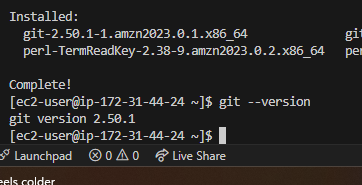
The Git installation process demonstrates proper package management and system configuration essential for establishing reliable version control capabilities on cloud development environments.
Installation Command Sequence:
sudo dnf update -y
sudo dnf install git -y
Installation Benefits:
- 📦 Package Manager Utilization - DNF package manager ensuring clean installation and dependency resolution
- 🔄 System Update Integration - Current package database ensuring latest Git version availability
- ⚡ Automated Installation - Non-interactive installation suitable for automation and scripting
- 🛡️ Security Validation - Package signature verification and integrity checking
GitHub Platform Integration and Collaboration Excellence
GitHub provides enterprise-grade repository hosting with advanced collaboration features, issue tracking, code review capabilities, and project management tools essential for professional software development operations.
GitHub Platform Benefits:
- ☁️ Cloud Repository Hosting - Reliable, scalable repository storage and access
- 👥 Team Collaboration Tools - Pull requests, code reviews, and discussion features
- 📊 Project Management Integration - Issue tracking, project boards, and milestone management
- 🔒 Security Features - Access controls, security scanning, and vulnerability alerts
- 📈 Analytics and Insights - Repository statistics, contribution tracking, and performance metrics
📂 Advanced Local Repository Management and Git Workflow Excellence
Git Repository Initialization and Configuration
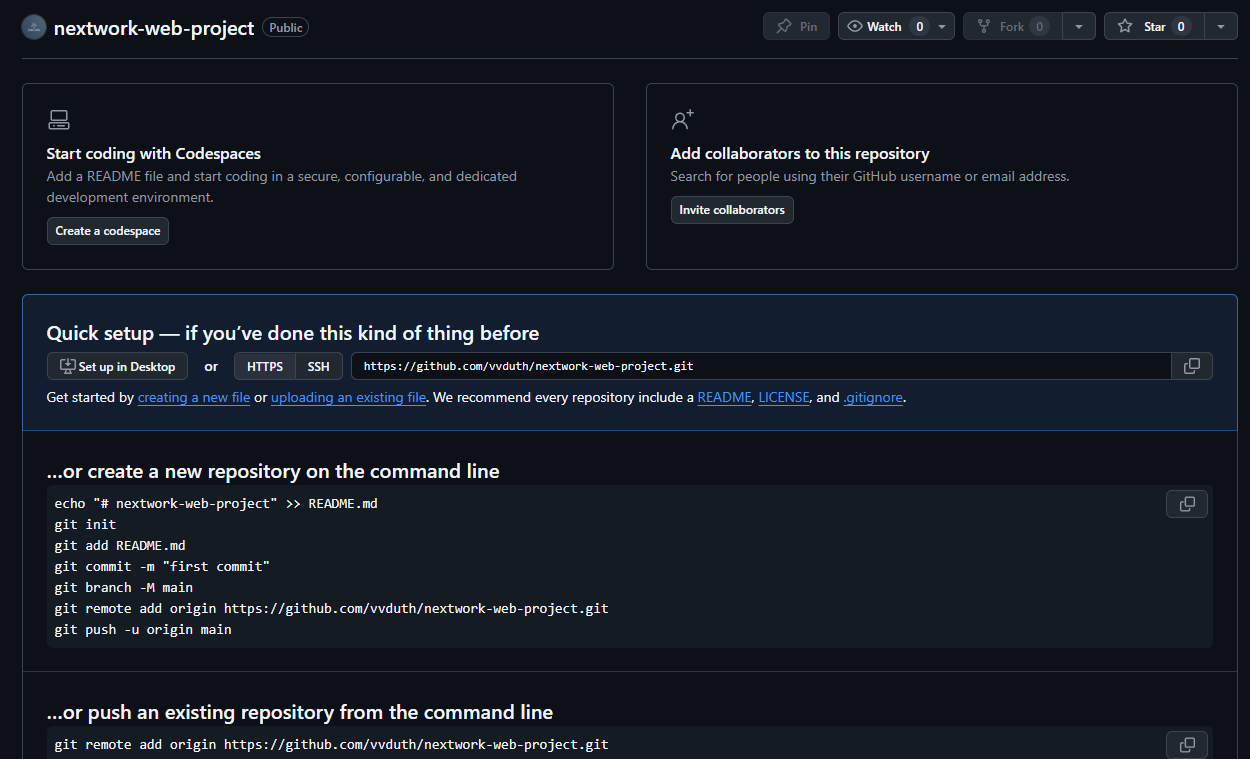
The local repository initialization demonstrates comprehensive understanding of Git repository architecture, branch management, and configuration best practices essential for professional version control operations.
Repository Initialization Process:
- 📁 Repository Creation -
git initcommand establishing .git directory structure - 🌿 Default Branch Configuration - Initial branch creation with customizable naming conventions
- ⚙️ Configuration Setup - Repository-specific settings and global configuration management
- 📋 Working Directory Preparation - Project file organization and initial state establishment
Git Branch Management and Development Strategy
Branch management represents a critical aspect of professional Git workflows, enabling parallel development, feature isolation, and collaborative programming methodologies.
Branch Architecture Benefits:
- 🔄 Parallel Development - Simultaneous feature development without main branch interference
- 🛡️ Feature Isolation - Independent development lines preventing experimental code conflicts
- 👥 Team Collaboration - Multiple developers working on different features simultaneously
- 🧪 Experimental Safety - Risk-free experimentation with easy rollback capabilities
Default Branch Configuration and Naming Conventions
Branch Naming Evolution:
- Legacy Naming - Traditional "master" branch as default development line
- Modern Conventions - "main" branch adoption for inclusive terminology
- Custom Configuration - Organization-specific branch naming standards
- Global Configuration - System-wide default branch name settings
Branch Configuration Commands:
# Global default branch configuration
git config --global init.defaultBranch main

# Rename current branch
git branch -m main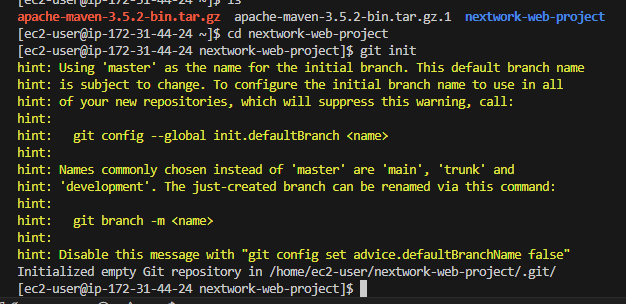
🔄 Advanced Git Workflow Implementation and Change Management Excellence
Three-Stage Git Workflow Architecture
The comprehensive Git workflow demonstrates sophisticated understanding of change management, staging area utilization, and remote repository synchronization essential for professional development operations.
Stage 1: Remote Repository Configuration
Remote Origin Setup:
git remote add origin https://github.com/username/repository.gitRemote Configuration Benefits:
- 🔗 Repository Linking - Establishes connection between local and remote repositories
- 📋 Origin Designation - Standard naming convention for primary remote repository
- 🔄 Synchronization Foundation - Enables push/pull operations for change synchronization
- 👥 Collaboration Infrastructure - Multi-developer access to shared repository
Stage 2: Staging Area Management and Change Preparation
The Git staging area represents a sophisticated change management mechanism enabling selective commit preparation and granular change control essential for professional version control operations.
Staging Area Architecture:
- 📋 Change Selection - Selective file staging for precise commit composition
- 🔍 Review Opportunity - Change validation before permanent commit creation
- ⚡ Commit Preparation - Organized change grouping for logical commit structure
- 🛡️ Quality Control - Pre-commit validation and change verification
Git Add Command Variations:
# Stage specific file
git add filename.ext

# Stage all changes
git add .

# Stage all tracked files
git add -u

# Interactive staging
git add -i
Stage 3: Commit Creation and Message Standards
Professional commit practices demonstrate understanding of change documentation, project history management, and collaborative communication essential for enterprise development workflows.
Commit Message Excellence:
git commit -m "Updated index.jsp with new content"Commit Best Practices:
- 📝 Descriptive Messages - Clear, concise change descriptions for future reference
- 🎯 Atomic Commits - Single-purpose commits enabling precise change tracking
- 📋 Consistent Format - Standardized commit message structure for team coordination
- 🔍 Searchable History - Meaningful messages enabling efficient project history navigation
Stage 4: Remote Synchronization and Upstream Configuration
Push Command with Upstream Setup:
git push -u origin masterUpstream Configuration Benefits:
- 🔄 Default Branch Tracking - Automated branch relationship for future operations
- ⚡ Simplified Commands -
git pushandgit pullwithout branch specification - 📋 Workflow Efficiency - Reduced command complexity for routine operations
- 🎯 Error Prevention - Default branch prevention of accidental push/pull mistakes
🔒 Advanced Authentication and Security Implementation Excellence
GitHub Authentication Evolution and Security Enhancement
The authentication configuration demonstrates advanced understanding of modern security practices, token-based authentication, and credential management essential for secure development workflows.
Authentication Security Evolution:
- ❌ Password Deprecation - GitHub eliminated password authentication for enhanced security
- 🔑 Token-Based Authentication - Personal Access Tokens (PATs) providing secure API access
- 🛡️ Enhanced Security Posture - Reduced credential exposure and improved access control
- ⚡ Granular Permissions - Scope-based access control for specific repository operations
Git Identity Configuration and Commit Attribution
Git identity configuration ensures proper commit attribution, collaboration tracking, and professional project management essential for team development environments.
Identity Configuration Commands:
git config --global user.name "Your Name"
git config --global user.email "your.email@example.com"
Identity Configuration Benefits:
- 👤 Commit Attribution - Clear identification of change authors for accountability
- 📊 Contribution Tracking - Team member activity monitoring and recognition
- 📞 Contact Information - Author reachability for change-related discussions
- 📝 Audit Trail - Complete change history with author identification
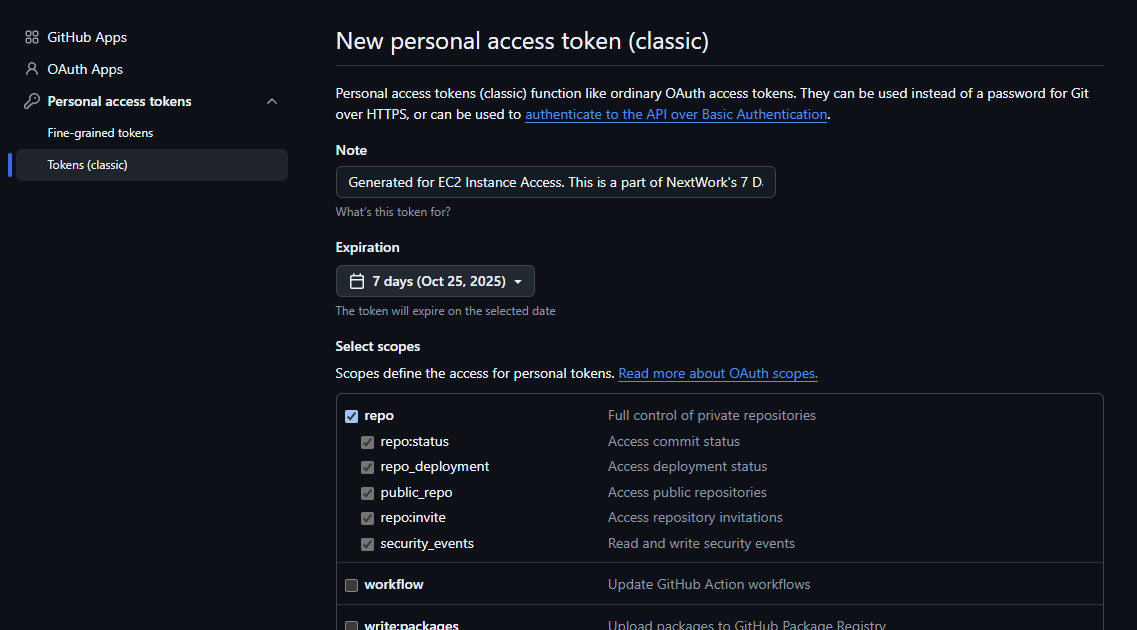
Personal Access Token Implementation and Security Excellence
Personal Access Token configuration demonstrates sophisticated understanding of modern authentication mechanisms and secure credential management practices essential for enterprise development security.
Token Generation Process:
- GitHub Settings Access - Navigate to Developer settings > Personal access tokens
- Token Creation - Generate new token with descriptive name
- Scope Selection - Configure repository permissions and access levels
- Token Security - Secure token storage and usage in development workflows
Token Security Benefits:
- 🔒 Enhanced Security - Token-based authentication superior to password methods
- ⏰ Expiration Management - Configurable token lifetimes reducing security exposure
- 🎯 Scope Limitation - Granular permission control for specific operations
- 🔄 Revocation Capability - Immediate token invalidation for security incidents
- 📊 Usage Monitoring - Token activity tracking and audit capabilities
🔄 Advanced Change Management and Repository Synchronization Excellence
Live Change Implementation and Git Workflow Validation
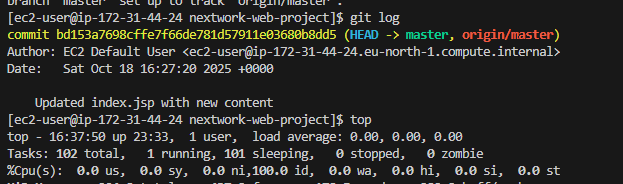
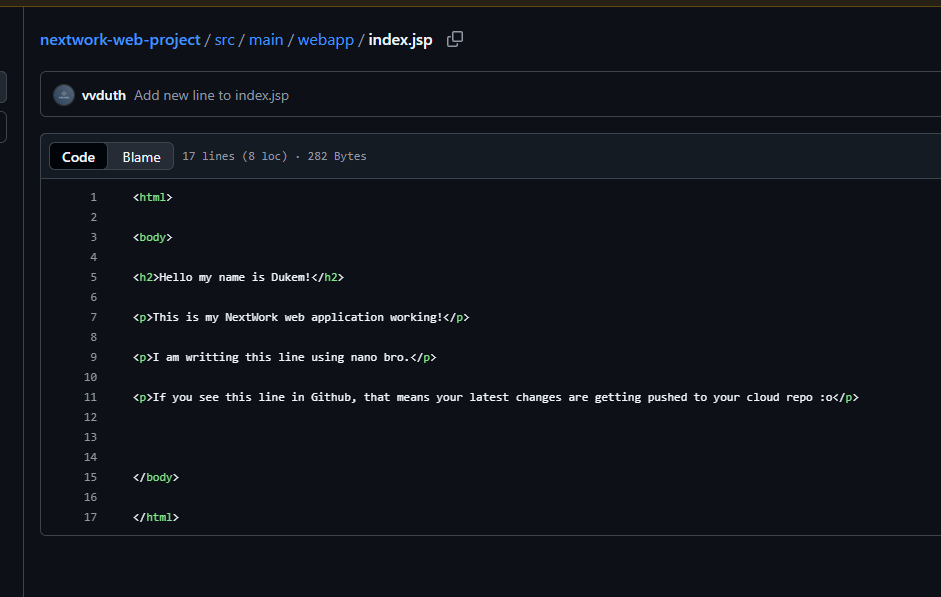
The change implementation process demonstrates comprehensive understanding of the complete Git workflow, from local modifications through remote repository synchronization, essential for continuous development operations.
Change Implementation Workflow:
- 📝 Local File Modification - src/index.jsp file updates with new content
- 🔍 Change Detection - Git status monitoring for modified file identification
- 📋 Staging Process - Modified files added to staging area for commit preparation
- 💾 Commit Creation - Changes committed with descriptive message
- 🚀 Remote Synchronization - Local commits pushed to GitHub repository
Change Validation Process:
- 📊 Local Repository Status - Changes visible in local Git history
- 🔄 Remote Repository Update - GitHub interface reflecting committed changes
- 📝 Commit Message Display - Descriptive commit messages visible in GitHub history
- ⏰ Timestamp Tracking - Change timing information for project timeline
Repository Synchronization Benefits:
- ☁️ Cloud Backup - Secure cloud storage preventing data loss
- 👥 Team Accessibility - Shared access to latest code changes
- 📈 Change History - Complete project evolution tracking
- 🔄 Collaboration Enablement - Multi-developer workflow foundation
📚 Advanced Documentation Excellence and README.md Implementation
Professional README.md Creation and Markdown Mastery
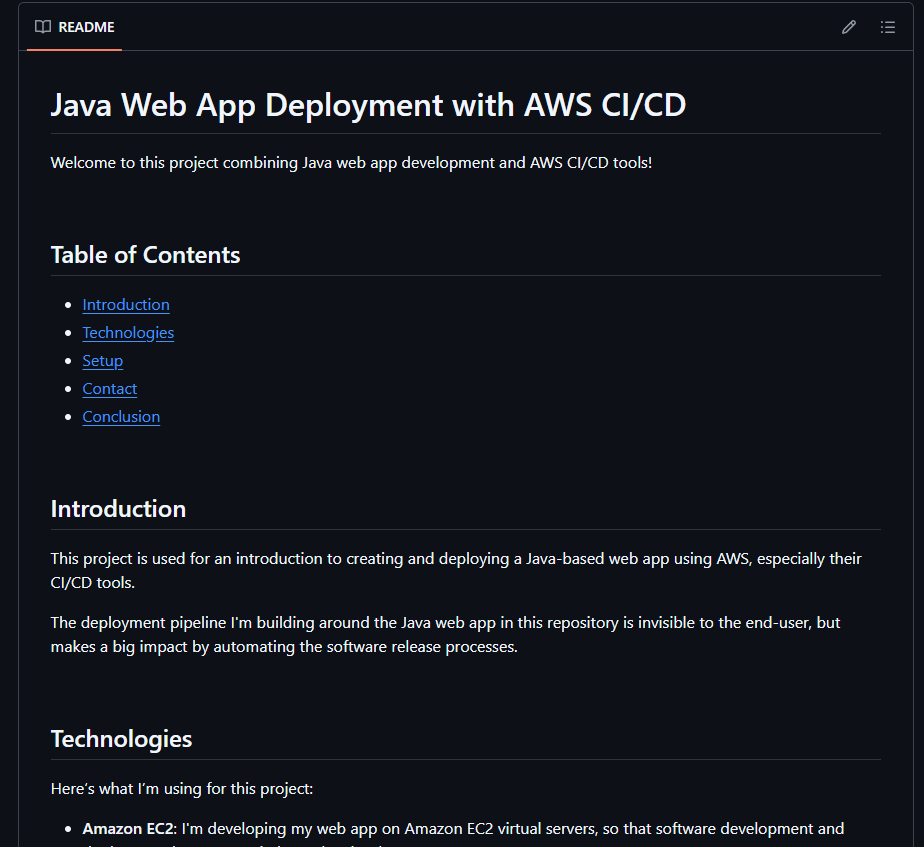
README.md file creation demonstrates sophisticated understanding of project documentation, Markdown formatting, and professional project presentation essential for open-source development and team collaboration.
README.md Strategic Importance:
- 📖 Project Introduction - Clear project purpose and functionality explanation
- 🚀 Quick Start Guide - Installation and usage instructions for rapid onboarding
- 👥 Collaboration Enhancement - Team member and contributor guidance
- 🎯 Professional Presentation - Project credibility and quality demonstration
Markdown Formatting Excellence and Documentation Standards
Markdown utilization demonstrates advanced formatting capabilities enabling professional documentation creation with GitHub integration and enhanced readability.
Advanced Markdown Features:
# Main Heading
## Subheading
### Sub-subheading

**Bold Text** and *Italic Text*
`Inline Code` and code blocks:

```javascript
function example() {
    return "Hello World";
}
```

- Bulleted lists
1. Numbered lists

[Link Text](https://example.com)
> Blockquotes for important notes
Markdown Benefits for Documentation:
- 📝 Clean Formatting - Professional appearance without complex markup
- 🔄 GitHub Integration - Native rendering in GitHub repository interface
- ⚡ Easy Editing - Simple syntax enabling rapid documentation updates
- 📱 Cross-Platform Compatibility - Consistent rendering across different platforms
Comprehensive README.md Structure and Content Organization
Professional README.md Sections:
- 🎉 Welcome Section - Project title and brief description introduction
- 📋 Table of Contents - Navigation structure for comprehensive documentation
- 💡 Introduction - Detailed project goals and objectives explanation
- 🛠️ Technologies - Complete technology stack and dependency listing
- ⚙️ Setup Instructions - Step-by-step installation and configuration guidance
- 📞 Contact Information - Maintainer contact details and collaboration channels
- 🎯 Conclusion - Project summary and contribution encouragement
Documentation Excellence Benefits:
- 👥 User Onboarding - Rapid project understanding and setup capability
- 🔄 Contributor Attraction - Clear contribution guidelines and project structure
- 📊 Professional Credibility - High-quality documentation demonstrating project maturity
- 🎯 Maintenance Efficiency - Reduced support overhead through comprehensive documentation
🎉 Project Success and Version Control Mastery Validation
Successfully Implemented Enterprise Version Control System
✅ Complete Git Installation and Configuration - Professional development environment with global identity configuration
✅ Advanced Local Repository Management - Repository initialization with branch management and configuration
✅ GitHub Integration Excellence - Remote repository setup with secure authentication implementation
✅ Personal Access Token Security - Modern authentication replacing password-based access
✅ Complete Git Workflow Implementation - Add, commit, push workflow with staging area mastery
✅ Change Management Excellence - Live change implementation with repository synchronization
✅ Professional Documentation Creation - Comprehensive README.md with Markdown formatting excellence
✅ CI/CD Foundation Preparation - Version control infrastructure ready for pipeline integration
Advanced Version Control Engineering Skills Demonstrated
- Git Workflow Mastery - Comprehensive understanding of distributed version control operations
- GitHub Platform Expertise - Advanced repository management and collaboration features
- Security Implementation Excellence - Personal Access Token configuration and secure authentication
- Branch Management Proficiency - Default branch configuration and parallel development strategies
- Documentation Excellence - Professional README.md creation with Markdown expertise
- Remote Repository Integration - Origin setup and upstream branch configuration mastery
- Change Tracking Excellence - Staging area utilization and commit message standards
- Collaboration Preparation - Team-ready version control infrastructure and workflows
🔍 Critical Version Control Insights and Implementation Best Practices
Key Git and GitHub Development Learning Points
- Security-First Authentication - Implement Personal Access Tokens from initial setup
- Identity Configuration Priority - Configure Git identity before first commit operations
- Branch Strategy Planning - Establish branch naming conventions and default branch policies
- Documentation Excellence - Create comprehensive README.md from project initialization
- Workflow Standardization - Establish consistent add, commit, push patterns for team adoption
Git and GitHub Best Practices and Advanced Techniques
- Use Descriptive Commit Messages - Clear, concise change descriptions for project history
- Implement Atomic Commits - Single-purpose commits enabling precise change tracking
- Configure Global Git Settings - User identity and default branch configuration
- Utilize Staging Area Strategically - Selective change staging for organized commit structure
- Maintain Professional Documentation - Comprehensive README.md with project information
- Implement Security Best Practices - Personal Access Tokens and secure credential management
- Establish Upstream Tracking - Default branch relationships for workflow efficiency
🚀 Advanced Git Features and Enterprise Considerations
Enterprise Version Control Architecture Patterns
- Git Flow Implementation - Advanced branching strategies for large team development
- Pull Request Workflows - Code review processes and collaborative development
- GitHub Actions Integration - Automated workflows and CI/CD pipeline triggers
- Issue Tracking Integration - Project management and bug tracking workflows
- Multi-Repository Management - Submodules and monorepo strategies for complex projects
Advanced GitHub Features and Capabilities
- GitHub Pages Integration - Static site hosting and documentation publishing
- Security Advisory Features - Vulnerability scanning and dependency management
- Project Management Tools - Kanban boards, milestones, and issue templates
- Code Review Tools - Pull request reviews, suggestions, and collaboration features
- Integration Ecosystem - Third-party service integration and marketplace apps
📚 Advanced Version Control Learning Resources
Git and GitHub Documentation
- Official Git Documentation
- GitHub Documentation
- GitHub Guides and Tutorials
- Pro Git Book (Free Online)
Version Control Best Practices
- Atlassian Git Tutorials
- GitHub Blog - Best Practices
- Git Flow Branching Model
- Conventional Commits Specification
🤝 Project Impact and Professional Version Control Development
This GitHub Integration and Version Control project provided comprehensive, hands-on experience with enterprise-grade source control management, secure authentication mechanisms, and professional documentation practices essential for modern software development and team collaboration. The intensive project showcased advanced skills in Git workflow implementation, GitHub platform utilization, and collaborative development preparation critical for professional software engineering and DevOps roles.
Professional Development Impact: Successfully completing a comprehensive GitHub integration project demonstrates essential skills for software developers, DevOps engineers, technical writers, and project managers. The project combines technical implementation expertise with collaboration best practices, providing practical experience directly applicable to team-based development roles and open-source contribution specializations.
Technical Achievement Significance: The systematic implementation of version control workflows and successful integration with cloud-based repository hosting demonstrates advanced understanding of modern development practices and collaborative software engineering. The ability to create secure authentication workflows while maintaining professional documentation standards shows mastery of contemporary software development and project management.
Career Development Value: This project addresses real-world version control challenges faced by development teams implementing collaborative workflows and professional project management. The demonstrated ability to implement sophisticated version control systems, secure authentication mechanisms, and comprehensive documentation provides practical experience essential for software development roles, DevOps positions, and technical leadership specializations.
This project demonstrates advanced Git and GitHub expertise essential for software developers, DevOps engineers, technical writers, and project managers, showcasing comprehensive understanding of version control workflows, secure authentication, collaborative development, and documentation excellence required for delivering reliable, efficient, and professional software development systems in modern enterprise development environments.
Project Duration: 2 hours
Project Source: NextWork.org - GitHub Integration Project
Skill Level: Advanced Version Control and Source Control Management
Contact: ducthai060501@gmail.com
This project showcases advanced Git and GitHub expertise essential for enterprise software development collaboration, demonstrating comprehensive understanding of version control workflows, secure authentication mechanisms, professional documentation, and team collaboration required for delivering reliable, efficient, and scalable version control systems in professional software development environments.