⚡ AWS DynamoDB Data Loading and Management Project

A comprehensive AWS NoSQL database project demonstrating Amazon DynamoDB table creation, data loading with AWS CLI, CloudShell operations, batch data import, and advanced NoSQL database management techniques for high-performance, scalable applications.
Project Link: View Project
Author: Duc Thai
Email: ducthai060501@gmail.com
Duration: 60 minutes
Difficulty Level: Intermediate to Advanced
🎯 Project Overview
This project focuses on implementing Amazon DynamoDB, AWS's fully managed NoSQL database service, demonstrating table creation, data loading operations, AWS CLI automation, and advanced NoSQL database management techniques essential for modern high-performance applications requiring flexible data models and massive scalability.
⚡ Understanding Amazon DynamoDB
Amazon DynamoDB is AWS's fully managed NoSQL database service designed for high-performance applications requiring flexible data models. Key capabilities include:
- NoSQL Architecture - Stores data in flexible key-value or document format
- Massive Scale Support - Handles massive amounts of data with consistent performance
- Ultra-Low Latency - Delivers single-digit millisecond response times
- Automatic Scaling - Scales up or down automatically based on demand
- Fully Managed Service - Eliminates server and infrastructure management
- High Availability - Built-in fault tolerance and disaster recovery
- Application Optimization - Ideal for real-time web apps, gaming, IoT, and mobile applications
- Flexible Data Models - Supports structured and semi-structured data patterns
🚀 DynamoDB Implementation in This Project
In this project, I implemented a comprehensive DynamoDB solution demonstrating:
- Multiple Table Creation - Created multiple DynamoDB tables with different schema patterns
- AWS CloudShell Integration - Used CloudShell for efficient CLI operations
- Batch Data Loading - Loaded large datasets using AWS CLI batch operations
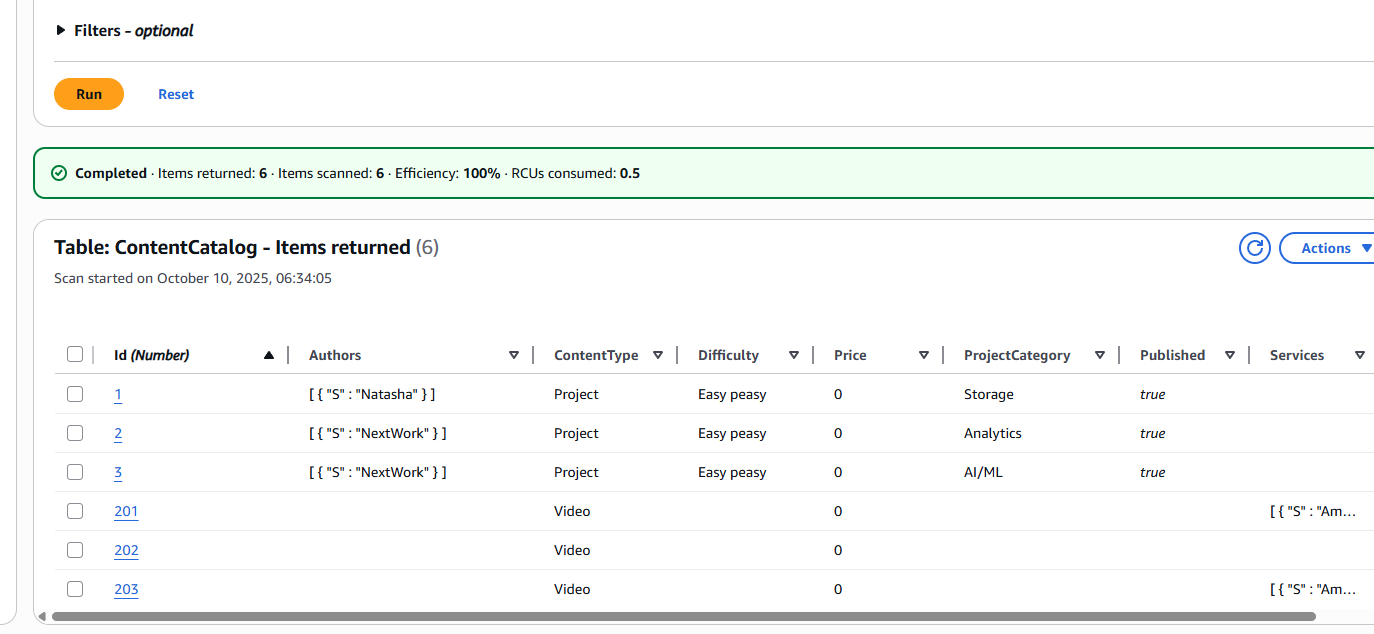
- Data Visualization - Viewed, queried, and updated data through various interfaces
- Schema Design - Practiced structured and semi-structured data organization
- Partition and Sort Keys - Implemented partition and sort key strategies
- Performance Optimization - Explored DynamoDB's efficient data management capabilities
- Serverless Operations - Managed data without server infrastructure concerns
💡 Key Learning: Effortless Large-Scale Data Operations
Unexpected Discovery: The project revealed the remarkable ease and efficiency of DynamoDB's large-scale data operations.
Critical Insight: DynamoDB's data loading and organization capabilities exceed expectations:
- Rapid Data Loading - JSON files and batch-write CLI commands enable quick large dataset uploads
- Automatic Organization - DynamoDB automatically organizes data using partition and sort keys
- Query Optimization - Key-based organization enables lightning-fast query performance
- Batch Operation Efficiency - Single commands can process thousands of records efficiently
- Seamless Scaling - Handles data growth without performance degradation
Key Takeaway: DynamoDB transforms complex data operations into simple, efficient processes—its automatic data organization and batch processing capabilities make it exceptionally suitable for applications requiring rapid data access and massive scalability.
📋 DynamoDB Table Architecture and Design
Understanding DynamoDB Data Structure
DynamoDB organizes data using a flexible yet structured approach:
- Items and Attributes - Tables contain multiple items (similar to rows) with attributes (similar to columns)
- Flexible Schema - Each item can have unique attributes, unlike rigid relational database schemas
- Primary Key Requirement - Every table must have a primary key for unique item identification
- Key Types - Primary key can be simple (partition key only) or composite (partition key + sort key)
- Data Distribution - Primary key determines how DynamoDB distributes data across partitions
- Query Performance - Key structure directly impacts query efficiency and performance
Attribute Structure and Flexibility
DynamoDB attributes provide exceptional flexibility for data modeling:
- Attribute Definition - Single piece of data or column within a table item
- Data Type Support - Supports strings, numbers, binary data, and complex data types
- Item Structure - Each item can contain one or more attributes
- Schema Flexibility - Unlike relational databases, items don't require identical attributes
- Dynamic Attributes - Items can have unique attribute sets based on requirements
- Example Application - Item "Nikko" with attribute "number of projects completed"

⚙️ Capacity Planning and Performance Management
Understanding Read and Write Capacity Units
DynamoDB uses capacity units to manage performance and throughput:
- Read Capacity Units (RCUs) - Define how many items your table can read per second
- Write Capacity Units (WCUs) - Define how many items your table can write per second
- Performance Planning - Help plan for expected application throughput requirements
- Throttling Prevention - Avoid request throttling during high-traffic periods
- Cost Management - Directly impact pricing and operational costs
- Scalability Control - Enable precise control over database performance characteristics
AWS Free Tier Optimization
I optimized the project for AWS Free Tier benefits:
- Free Tier Allocation - 25 GB data storage, 25 WCUs, and 25 RCUs per month
- Request Volume - Supports approximately 200 million requests monthly at no cost
- Auto Scaling Disabled - Turned off auto scaling to maintain predictable throughput
- Cost Control - Kept throughput within Free Tier limits to avoid unexpected charges
- Predictable Performance - Maintained consistent capacity allocation
- Budget Management - Avoided automatic scaling that could incur additional costs

☁️ AWS CloudShell and CLI Integration
Understanding AWS CloudShell
AWS CloudShell provides a powerful cloud-based development environment:
- Browser-Based Shell - Shell environment directly in AWS Management Console
- Code Execution Platform - Space for running AWS commands and scripts
- Pre-installed CLI - AWS CLI comes pre-installed and configured
- No Setup Required - Eliminates need for local AWS CLI installation
- Instant Access - Immediate access to AWS services through command line
- Persistent Environment - Session persistence across browser sessions
AWS CLI Capabilities
AWS CLI transforms AWS resource management through command-line automation:
- Resource Management - Create, delete, and update AWS resources via commands
- Console Alternative - Command-line alternative to clicking through AWS console
- Automation Enablement - Enables scripting and automation of AWS operations
- Batch Operations - Perform bulk operations efficiently
- Infrastructure as Code - Support for infrastructure automation patterns
- CloudShell Integration - Pre-configured in CloudShell environment
DynamoDB Table Creation via CLI
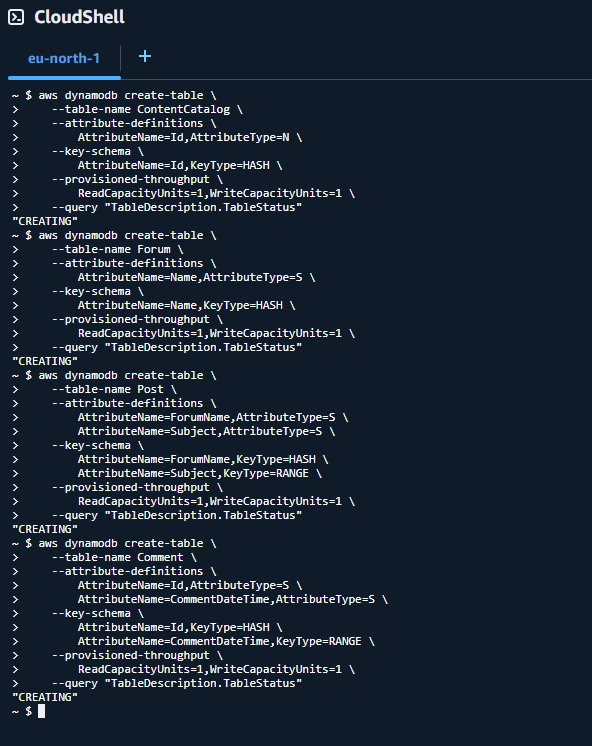
I executed CLI commands in AWS CloudShell to create a comprehensive table structure:
Created Tables:
- ContentCatalog Table - Numeric attribute called
Idfor content identification - Forum Table - Partition key called
Namefor forum organization - Post Table - Partition key
ForumNameand sort keySubjectfor post organization - Comment Table - Partition key
Idand sort keyCommentDateTimefor chronological comment storage
Sort Key Benefits: Enable efficient organization and querying of related items, providing chronological ordering and improved query performance.
📥 Advanced Data Loading with AWS CLI
Data Download and Preparation
I executed a comprehensive data loading workflow using AWS CloudShell:
# Download the sample data
curl -O https://storage.googleapis.com/nextwork_course_resources/courses/aws/AWS%20Project%20People%20projects/Project%3A%20Query%20Data%20with%20DynamoDB/nextworksampledata.zip

# Unzip the downloaded file
unzip nextworksampledata.zip

# Go into the extracted folder
cd nextworksampledata
DynamoDB JSON Format Structure
The nextworksampledata folder contains 4 JSON files formatted specifically for DynamoDB batch operations:
- "Forum" Specification - Identifies the target table for data insertion
- "PutRequest" Instruction - Tells DynamoDB to add a new item to the table
- Attribute Definition - Each PutRequest contains complete item attributes
- Batch Structure - Format optimized for efficient batch processing
- JSON Compliance - Proper JSON formatting for CLI consumption
Batch Data Loading Execution
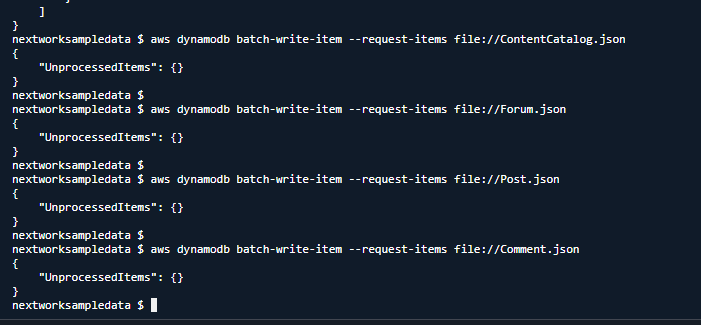
I used the AWS CLI batch-write command for efficient data loading:
aws dynamodb batch-write-item --request-items file://filename.jsonThis powerful command provides:
- Multiple Item Insertion - Inserts multiple items in a single operation
- Efficient Processing - Optimized for high-throughput data loading
- Atomic Operations - Ensures data consistency during batch operations
- Error Handling - Built-in error handling for failed operations
- Performance Optimization - Reduces API calls and improves loading speed
🔍 Data Analysis and Attribute Exploration
ContentCatalog Item Analysis
I examined ContentCatalog items to understand DynamoDB's flexible schema capabilities:
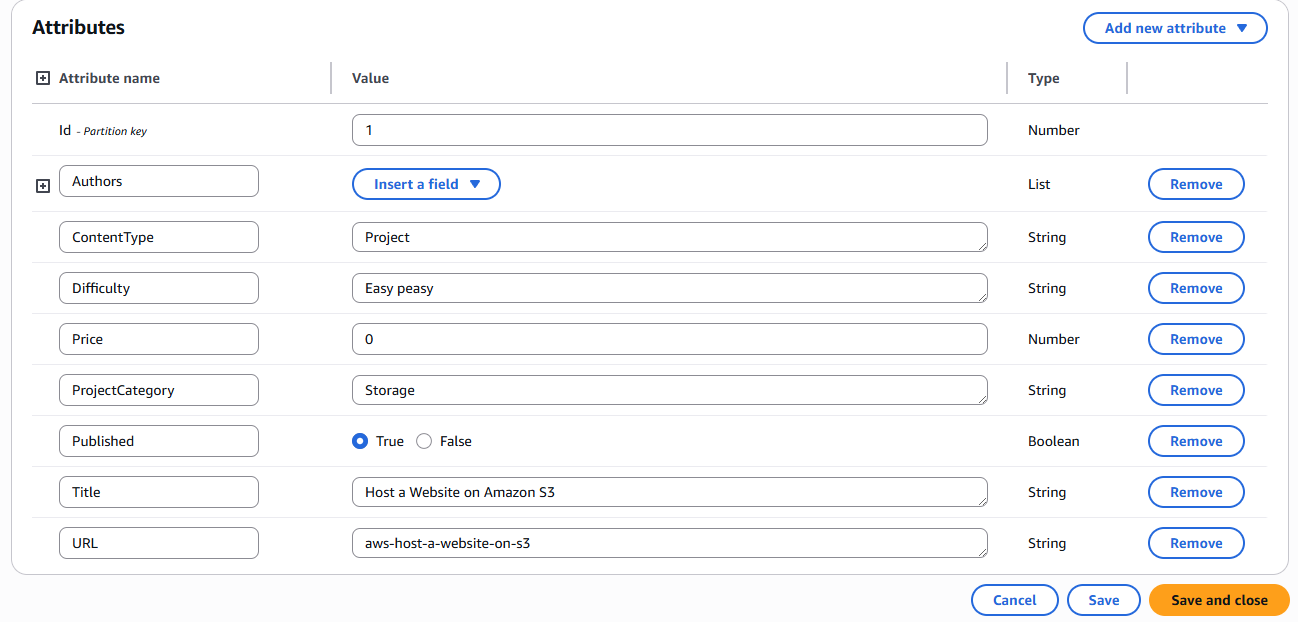
First ContentCatalog Item Attributes:
- Id - Unique numeric identifier for the resource
- Title - Name of the project or video content
- URL - Link to access the resource online
- Price - Cost information for the resource
- Difficulty - Skill level required (e.g., "Easy peasy")
- Published - Availability status (true/false boolean)
- ProjectCategory - Classification like Storage, Analytics, AI/ML
- ContentType - Type classification: "Project", "Video", "Shorts", or "Live Project Demo"
Second ContentCatalog Item Attributes:
- Id - Unique identifier (consistent across items)
- ContentType - Content classification
- Price - Pricing information
- Services - Associated AWS services
- Title - Resource name
- URL - Access link
- VideoType - Video-specific classification
Schema Flexibility Demonstration: The second item lacks Author and StudentComplete attributes, showcasing DynamoDB's flexible schema where items don't require identical attribute sets.
🚀 DynamoDB Advantages Over Relational Databases
Flexibility Advantage
DynamoDB provides superior flexibility compared to traditional relational databases:
- Schema-less Design - Each item doesn't need identical attributes
- Dynamic Field Addition - Easily add new fields without table structure changes
- Field Removal Flexibility - Remove fields without affecting entire table
- Rapid Development - Ideal for rapidly changing data requirements
- Unstructured Data Support - Handles unstructured and semi-structured data efficiently
- Application Evolution - Adapts to changing application needs without downtime
- Record Variation - Each record can contain different information types
- Modern Application Alignment - Perfect for modern, agile development practices
Performance Advantage
DynamoDB delivers superior performance through advanced architecture:
- Fully Managed Infrastructure - AWS handles all infrastructure optimization
- Key-Value Architecture - Direct data retrieval using primary keys
- Document-Based Storage - Optimized for document-style data access
- Complex Join Elimination - Avoids expensive join operations
- Automatic Scaling - Scales seamlessly based on demand
- In-Memory Caching - DynamoDB Accelerator (DAX) provides microsecond latency
- SSD Storage - High-performance SSD storage for fast access
- Million Request Handling - Supports millions of requests per second
- High-Traffic Optimization - Optimized for high-traffic, latency-critical applications
🏆 Project Outcomes and Technical Achievements
Successfully Implemented
✅ Multiple DynamoDB Tables - Created tables with different key structures and use cases
✅ AWS CloudShell Mastery - Efficient CLI operations in cloud environment
✅ Batch Data Loading - Large-scale data import using JSON and CLI commands
✅ Schema Design Patterns - Implemented partition and sort key strategies
✅ Flexible Data Modeling - Demonstrated schema-less data organization
✅ Performance Optimization - Capacity planning and Free Tier optimization
✅ Data Analysis - Comprehensive item and attribute analysis
✅ NoSQL Best Practices - Applied NoSQL design principles and patterns
Technical Skills Demonstrated
- NoSQL Database Design - Advanced DynamoDB table design and key selection
- AWS CLI Proficiency - Command-line automation and batch operations
- CloudShell Operations - Cloud-based development environment usage
- Data Loading Automation - Efficient large-scale data import techniques
- Capacity Planning - Performance and cost optimization strategies
- JSON Data Management - Complex JSON structure manipulation and processing
- Schema Design - Flexible, performance-optimized schema patterns
- Database Performance Analysis - Understanding of NoSQL performance characteristics
🔍 Key Insights and Best Practices
Critical Learning Points
- Batch Operation Efficiency - DynamoDB's batch operations dramatically improve data loading performance
- Schema Flexibility Power - Schema-less design enables rapid application development and evolution
- Key Selection Impact - Partition and sort key selection directly impacts query performance
- Capacity Planning Importance - Proper capacity planning essential for cost and performance optimization
- CloudShell Productivity - Cloud-based CLI environment significantly improves development efficiency
DynamoDB Best Practices
- Key Design Strategy - Design partition keys for even data distribution
- Sort Key Optimization - Use sort keys for range queries and data organization
- Batch Operations - Prefer batch operations for bulk data manipulation
- Capacity Monitoring - Monitor and adjust capacity based on actual usage patterns
- Global Secondary Indexes - Use GSIs for alternative query patterns
- Item Size Optimization - Keep item sizes reasonable for optimal performance
- Cost Optimization - Balance performance requirements with cost considerations
🔄 Advanced Implementation Considerations
Enterprise DynamoDB Architecture
- Global Tables - Multi-region replication for global applications
- DynamoDB Streams - Real-time data change tracking and processing
- Point-in-Time Recovery - Backup and recovery strategies
- DynamoDB Accelerator (DAX) - Microsecond latency caching
- Auto Scaling - Dynamic capacity adjustment based on demand
Security and Compliance
- Encryption at Rest - Enable encryption for sensitive data
- IAM Integration - Fine-grained access control with IAM
- VPC Endpoints - Private connectivity within VPC
- CloudTrail Integration - Comprehensive audit logging
- Compliance Standards - Meet industry-specific compliance requirements
📚 Learning Resources
AWS Documentation
- Amazon DynamoDB Developer Guide
- DynamoDB Best Practices
- AWS CloudShell User Guide
- AWS CLI User Guide
Advanced Topics
🤝 Project Reflection
This AWS DynamoDB Data Loading and Management project provided comprehensive hands-on experience with NoSQL database design, automation, and large-scale data operations. The most significant insight was discovering how DynamoDB transforms traditionally complex database operations into simple, efficient processes through its automatic data organization and powerful batch processing capabilities.
Key Takeaway: DynamoDB represents a paradigm shift from traditional database management—its schema flexibility, automatic scaling, and batch operation efficiency make it exceptionally suitable for modern applications requiring rapid development, massive scale, and consistent performance. The project demonstrated that with proper key design and batch operations, DynamoDB can handle enterprise-scale data management tasks with remarkable simplicity and efficiency.
This project demonstrates advanced NoSQL database skills essential for modern application developers, cloud architects, and data engineers, showcasing comprehensive understanding of flexible data modeling, performance optimization, and automation techniques required for scalable, high-performance applications.
Project Duration: 60 minutes
Project Source: NextWork.org - Load Data into DynamoDB
Skill Level: Intermediate to Advanced NoSQL Database Management
Contact: ducthai060501@gmail.com
This project showcases advanced AWS DynamoDB skills essential for NoSQL database management, demonstrating comprehensive understanding of flexible data modeling, batch operations, performance optimization, and automation patterns required for modern, scalable applications.