🌐 AWS Aurora Web Application Integration Project

A comprehensive full-stack AWS application project demonstrating Amazon Aurora database integration with EC2 web applications, PHP-MySQL connectivity, real-time data management, and enterprise web application architecture with secure database connectivity patterns.
Project Link: View Project
Author: Duc Thai
Email: ducthai060501@gmail.com
Duration: 1 hour
Difficulty Level: Advanced
🎯 Project Overview
This project focuses on implementing a complete web application stack using Amazon Aurora as the backend database and EC2 as the web server, demonstrating full-stack AWS application development, PHP-MySQL integration, real-time data connectivity, and enterprise web application architecture essential for modern cloud-based applications.
🌟 Understanding Amazon Aurora
Amazon Aurora is AWS's fully managed relational database service designed for enterprise performance and reliability. Advanced capabilities include:
- Fully Managed Service - Complete database management without infrastructure overhead
- MySQL and PostgreSQL Compatibility - Seamless integration with existing applications and tools
- Enterprise Performance - Speed and reliability of high-end commercial databases
- Open-Source Economics - Cost-effectiveness of open-source database solutions
- Automated Management - Handles backups, patching, and scaling automatically
- Developer Focus - Enables focus on application development rather than database management
- High Availability - Multi-Availability Zone replication for fault tolerance
- Performance Optimization - Built-in performance and fault tolerance features
🚀 Aurora Web Application Implementation
In this project, I implemented a comprehensive web application solution demonstrating:
- Aurora Database Cluster - Established main relational database for web application data
- Data Storage and Management - Configured robust data storage and management system
- EC2 Web Server Integration - Connected Aurora database cluster to EC2 instance
- PHP Application Development - Configured web application to interact using PHP
- Real-Time Data Display - Enabled web app to display live data from Aurora database
- Dynamic Data Updates - Implemented live data updates stored in Aurora database
- Cloud Database Integration - Demonstrated seamless cloud database integration with web applications
- Full-Stack Architecture - Showcased complete full-stack application architecture
💡 Key Learning: Configuration Complexity
Unexpected Discovery: The project revealed the numerous small configuration details required for proper EC2-Aurora communication.
Critical Insight: Database-web server connectivity requires comprehensive configuration management:
- Initial Simplicity Assumption - Expected simple connection between EC2 and Aurora
- Security Group Adjustments - Required detailed security group configuration
- Permission Configuration - Needed proper permission settings for service communication
- File Ownership Management - Required correct file ownership configurations
- Network Configuration - Networking setup critical for proper communication
- Access Control Importance - Access control as important as application code
Key Takeaway: Successful cloud application development requires equal attention to infrastructure configuration, networking, and access control as to application code—every component must work together seamlessly for enterprise applications.
💻 Web Application Development and Setup
EC2 Instance SSH Connection
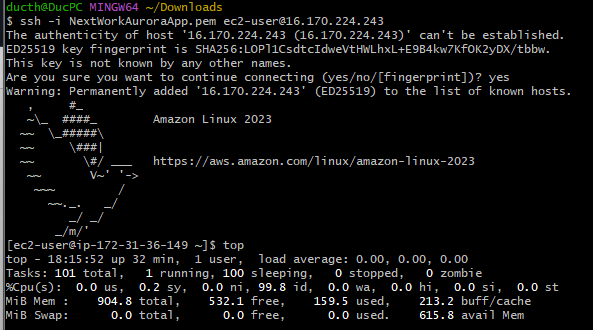
I established secure connection to my EC2 instance using:
ssh -i NextWorkAuroraApp.pem ec2-user@16.170.224.243This command provides:
- Private Key Authentication - Uses private key file (NextWorkAuroraApp.pem) for secure authentication
- User Specification - Logs in as ec2-user with proper permissions
- Public IP Access - Connects to instance using specified public IP address
- Secure Connection - Establishes encrypted SSH connection for server management
- Configuration Access - Enables software installation and server configuration
- Aurora Integration Setup - Allows setup of web app to communicate with Aurora database
Web Server and PHP Stack Installation
I installed the complete web application stack using:
sudo dnf install -y httpd php php-mysqli mariadb105This installation provides:
- Apache Web Server (httpd) - Web server for hosting PHP applications
- PHP Runtime - Server-side scripting language for dynamic web content
- MySQLi Extension - PHP extension for connecting to MySQL/Aurora databases
- MariaDB Client Tools - Database interaction and management tools
- Complete LAMP Stack - Linux, Apache, MySQL, PHP environment
Web Server Activation
I started the Apache web server using:
sudo systemctl start httpdThis command:
- Activates Web Server - Starts Apache HTTP server daemon
- Enables Web Serving - Makes EC2 instance capable of serving web applications
- Port 80 Activation - Opens standard HTTP port for web traffic
- Application Hosting - Enables hosting of PHP web applications
🔗 Aurora Database Connectivity Configuration
File System Permissions Setup
I configured proper file system permissions for web application development:
sudo chown ec2-user:ec2-user /var/wwwThis command provides:
- User Ownership - Gives ec2-user ownership of web directory instead of root
- Development Access - Enables direct file editing without sudo privileges
- Security Management - Maintains proper security while enabling development
- File Management - Simplifies web application file management
Database Connection Configuration
I created a dedicated configuration directory and file structure:
- Directory Creation - Created
incfolder inside/var/www - Configuration File - Created
dbinfo.incfile for database connection details - File Editing - Used nano editor for configuration file management
Aurora Connection Configuration
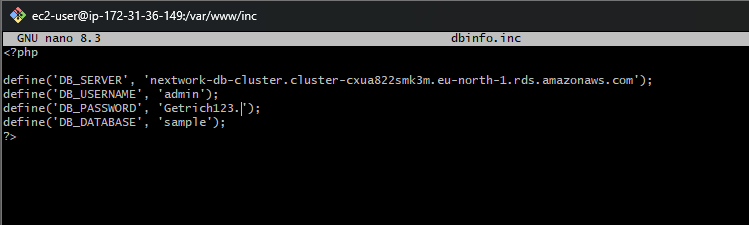
I configured the database connection details in dbinfo.inc:
<?php
define('DB_SERVER', 'nextwork-db-cluster.cluster-cxua822smk3m.eu-north-1.rds.amazonaws.com');
define('DB_USERNAME', 'admin');
define('DB_PASSWORD', 'Getrich123.');
define('DB_DATABASE', 'sample');
?>
This configuration provides:
- Database Server Endpoint - Aurora cluster endpoint for connection
- Authentication Credentials - Username and password for database access
- Database Selection - Specific database within Aurora cluster
- PHP Integration - PHP constants for easy application integration
- Secure Connection - Enables secure PHP application connection to Aurora
📈 Web Application Enhancement and Upgrade
Dynamic PHP Application Development
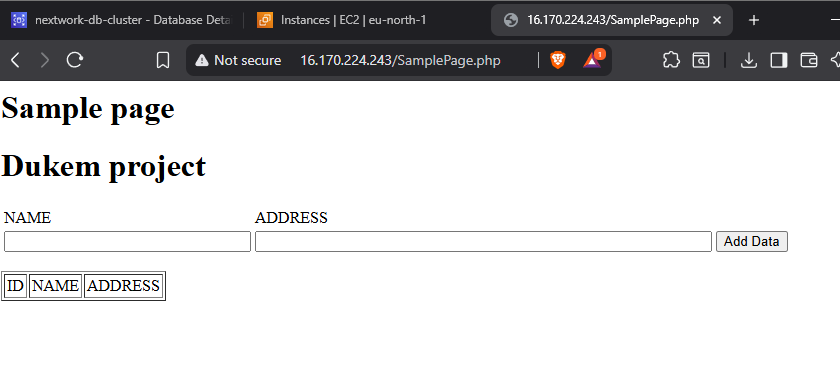
I enhanced the web application by creating a dynamic PHP page:
- Application Directory - Navigated to
/var/www/htmlfolder - PHP File Creation - Created new file called
SamplePage.php - Configuration Import - Imported connection details from
dbinfo.incfile - Database Integration - Used connection details to connect to Aurora database
Real-Time Data Integration
The upgraded web application provides:
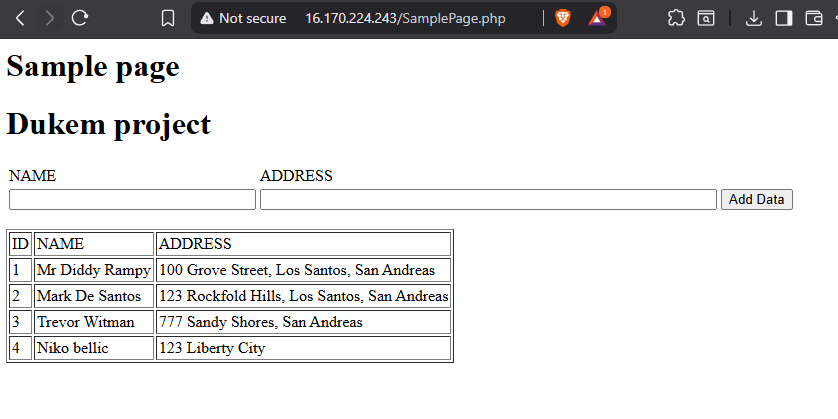
- Live Data Display - Web app displays real-time data directly from Aurora database
- Dynamic Updates - Shows updates or changes instantly on webpage
- Database Connectivity - Seamless connection between web interface and database
- Interactive Interface - Users can interact with database through web interface
- Real-Time Synchronization - Web application stays synchronized with database changes
🧪 Web Application Testing and Validation
MySQL Client Installation
I installed MySQL client tools for database validation:
- MySQL Repository Addition - Added MySQL repository to EC2 instance
- MySQL Client Installation - Installed MySQL client for database access
- Command Line Access - Enabled direct database command line interaction
Database Connectivity Validation
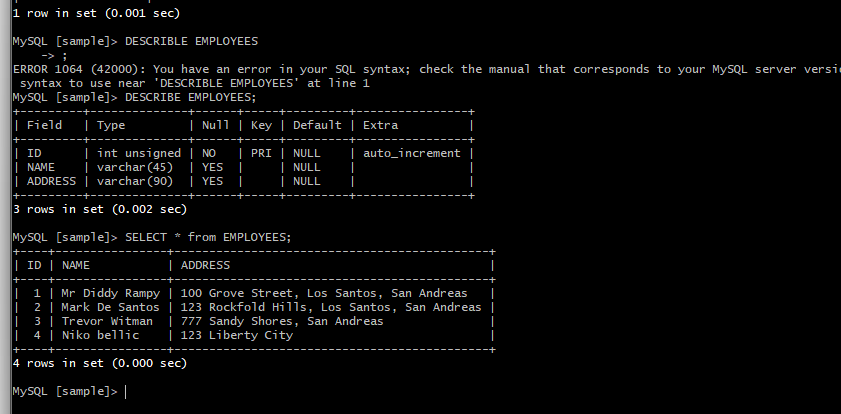
I validated the web application database connectivity using MySQL CLI:
- Aurora Cluster Connection - Connected to Aurora cluster using MySQL CLI
- Database Exploration - Executed
SHOW DATABASES;to list available databases - Database Selection - Used
USE sample;to select target database - Table Verification - Ran
SHOW TABLES;to confirm schema and tables - Structure Analysis - Executed
DESCRIBE employees;to view table structure - Data Validation - Used
SELECT * FROM employees;to check web app data updates
End-to-End Functionality Confirmation
The testing process confirmed:
- Web App Integration - New data added through web app appears in database
- Real-Time Updates - Database reflects web application changes immediately
- Connection Verification - Perfect connection between web app and Aurora
- Data Integrity - Data consistency between web interface and database
- Full-Stack Functionality - Complete end-to-end application functionality
🏆 Project Outcomes and Technical Achievements
Successfully Implemented
✅ Amazon Aurora Database Cluster - High-performance managed database with web app integration
✅ EC2 Web Server Configuration - Complete LAMP stack with Apache, PHP, and MySQL client
✅ PHP Application Development - Dynamic web application with database connectivity
✅ Real-Time Data Integration - Live data display and updates between web app and database
✅ Database Connection Management - Secure configuration file management for credentials
✅ Full-Stack Architecture - Complete web application stack with database backend
✅ Testing and Validation - Comprehensive testing of web app-database connectivity
✅ End-to-End Functionality - Complete user interface to database integration
Technical Skills Demonstrated
- Full-Stack Web Development - Complete web application development with database integration
- PHP-MySQL Programming - Advanced PHP application development with MySQL connectivity
- Aurora Database Management - Enterprise database cluster configuration and management
- Linux System Administration - EC2 instance configuration and service management
- Web Server Configuration - Apache HTTP server setup and management
- Database Connectivity Patterns - Secure database connection configuration and management
- Application Testing - Comprehensive end-to-end application testing methodologies
- AWS Service Integration - Multi-service architecture implementation and optimization
🔍 Key Insights and Best Practices
Critical Learning Points
- Configuration Complexity - Database-web server connectivity requires comprehensive configuration
- Infrastructure Importance - Infrastructure configuration as important as application code
- Security Integration - Security groups and permissions critical for service communication
- File Ownership Management - Proper file ownership essential for development workflow
- End-to-End Testing - Comprehensive testing validates complete application functionality
Web Application and Aurora Best Practices
- Configuration File Management - Separate database credentials from application code
- Security Group Configuration - Implement proper security groups for web-database communication
- Connection Pooling - Implement connection pooling for production applications
- Error Handling - Implement comprehensive error handling for database connections
- Performance Monitoring - Monitor application and database performance
- Backup Strategy - Implement regular backup and recovery procedures
- SSL/TLS Encryption - Use encrypted connections between web app and database
🔄 Advanced Implementation Considerations
Production-Ready Enhancements
- Load Balancing - Implement Application Load Balancer for high availability
- Auto Scaling - Configure Auto Scaling Groups for dynamic capacity management
- CDN Integration - Implement CloudFront for static content delivery
- SSL/TLS Certificates - Deploy SSL certificates for HTTPS encryption
- Environment Management - Separate development, staging, and production environments
Security and Monitoring
- WAF Implementation - Deploy Web Application Firewall for security
- CloudWatch Monitoring - Comprehensive application and database monitoring
- Log Management - Centralized logging with CloudWatch Logs
- IAM Roles - Replace credentials with IAM roles for enhanced security
- VPC Security - Implement comprehensive VPC security architecture
📚 Learning Resources
AWS Documentation
Development Resources
- PHP MySQLi Documentation
- Apache HTTP Server Documentation
- MySQL Documentation
- AWS Well-Architected Framework
🤝 Project Reflection
This AWS Aurora Web Application Integration project provided comprehensive hands-on experience with full-stack cloud application development, demonstrating the complexity and precision required for enterprise web application architecture. The most significant insight was understanding that successful cloud application development requires equal attention to infrastructure configuration, networking, security, and access control as to the application code itself.
Key Takeaway: The project's revelation about configuration complexity highlights that modern cloud applications are sophisticated systems requiring careful orchestration of multiple components. Every detail—from security groups to file permissions—must work together seamlessly. This understanding is essential for building robust, secure, and scalable enterprise applications in the cloud.
This project demonstrates advanced full-stack AWS development skills essential for web developers, cloud engineers, and application architects, showcasing comprehensive understanding of web application architecture, database integration, and cloud service orchestration required for production-grade applications.
Project Duration: 1 hour
Project Source: NextWork.org - Connect a Web App with Aurora
Skill Level: Advanced Full-Stack Development
Contact: ducthai060501@gmail.com
This project showcases advanced AWS Aurora and web application integration skills essential for full-stack cloud development, demonstrating comprehensive understanding of database-driven web applications, service integration, and enterprise application architecture patterns required for scalable, real-time applications.